There are moments when a credit card just isn’t enough.
Maybe your landlord only accepts bank transfers. Maybe you’re paying tuition, sending money to family, or settling something with a supplier who doesn’t take cards. In situations like these, you don’t need a credit card, you need cash.
That’s where RCBC UnliPay comes in.
At first glance, it sounds almost too convenient: use your credit card to send money directly to any bank account. No ATM withdrawals, no lining up, no explaining to anyone why you’re paying with plastic. But once you actually start using it, you’ll realize there are a few important details that can make it either a helpful tool or an expensive mistake.
- What RCBC UnliPay Actually Does
- Key Information: RCBC UnliPay at a Glance
- The Catch: It’s Not Free Money
- Why Some People Still Use It Anyway
- The “Installment Trick” (And What It Really Means)
- Things You’ll Want to Be Careful About
- What It Feels Like to Use (Based on Real Users)
- When It Makes Sense to Use UnliPay
- A Simple Way to Think About It
- Final Thoughts
What RCBC UnliPay Actually Does
UnliPay is essentially a credit-to-cash transfer feature built into RCBC credit cards.
Instead of swiping your card at a terminal, you send money straight to someone’s bank account or e-wallet. The amount is charged to your credit limit, and the recipient receives it like a normal fund transfer.
In real life, people use it for things like paying rent, covering tuition, paying contractors, or even sending money to relatives who don’t use digital payments. It fills that gap where credit cards normally don’t work.
The process itself is simple and handled inside the RCBC Pulz app. You enter the recipient’s details, type in the amount, confirm with an OTP, and the money is sent. For smaller amounts, it usually arrives almost instantly. Larger transfers can take a bit longer, sometimes until the next banking day.
Key Information: RCBC UnliPay at a Glance
| What it is | Credit card-to-bank transfer feature (send money using your credit limit) |
| How to access | Available via the RCBC Pulz app (no separate enrollment needed) |
| Processing fee | – 3% per transaction – Minimum fee of ₱50 – Waived it converted to installment |
| Interest rate | – No interest if paid in full by due date – If unpaid, standard RCBC credit card finance charges apply (typically around 3% monthly) |
| Installment option | – Can be converted via Unli Installment – Processing fee may be reversed/waived upon conversion – Interest applies depending on chosen term |
| Available terms (installment) | 3 to 36 months |
| Transaction limits | – Up to ₱100,000 per day – Up to ₱300,000 per rolling 30 days – Subject to available credit limit |
| Transfer speed | – ₱50,000 and below: usually real-time – Above ₱50,000: may take up to 1 banking day |
| Where you can send money | – Any local bank account – Select e-wallets |
| Rewards eligibility | Not eligible for points, miles, or cashback |
| Self-transfer restriction | Cannot send to your own account |
| Reversals/cancellations | Not allowed once transaction is completed |
The Catch: It’s Not Free Money
This is the part that trips most people up.
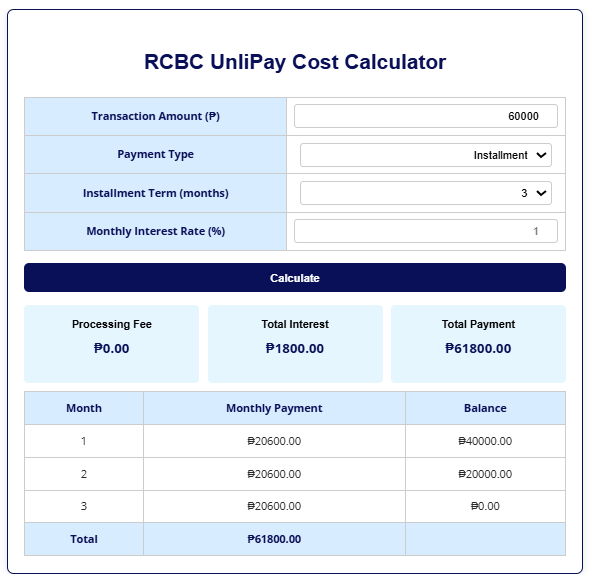
Every UnliPay transaction comes with a 3% processing fee (minimum ₱50), which is waived if you convert your transaction into an installment plan of at least 3 months.
That might not sound like much at first, but it adds up quickly.
- If you send ₱50,000, you’re paying an extra ₱1,500.
- If you convert to an installment, the ₱1,500 fee is waived, but you may need to pay the applied interest rate.
At that point, it starts to feel less like a convenience feature and more like a short-term loan with a built-in cost.
And unlike regular credit card purchases, UnliPay transactions don’t earn points or cashback. So you’re not getting anything back to offset the fee.
Access the RCBC UnliPay Calculator here.
Why Some People Still Use It Anyway
Despite the fee, UnliPay is still popular, and there’s a reason for that.
Some expenses simply can’t be paid with a credit card. If your only options are:
- delay the payment,
- borrow from someone,
- or use UnliPay,
then paying a few percent might be worth it for the convenience and speed.
There’s also a workaround that experienced users take advantage of: converting the transaction into installment.
The “Installment Trick” (And What It Really Means)
RCBC allows you to convert UnliPay transactions into installment plans through their Unli Installment feature. When you do this, the processing fee is often reversed or waived, but this is where things get a bit nuanced.
On paper, it sounds like an easy win: avoid the 3% fee by converting to installment. In practice, it depends on the terms you choose.
Shorter terms, like three months, sometimes come with little to no interest, but may still involve some cost. Longer terms are more likely to remove the upfront fee, but you’ll start paying interest instead.
So you’re not really eliminating the cost, you’re just choosing how to pay for it:
- upfront via the processing fee
- or gradually through interest
This is why experienced users don’t automatically convert everything to installment. They weigh which option ends up cheaper.
Things You’ll Want to Be Careful About
UnliPay is simple to use, but not very forgiving.
You can’t send money to your own account, which prevents people from turning it into a direct cash withdrawal workaround. More importantly, once the transaction is sent, there’s no easy way to reverse it. A wrong account number can mean real trouble.
It’s also worth remembering that this is still a credit card transaction. If you don’t pay your balance in full by the due date, standard finance charges will apply. That can quickly make an already expensive transfer even more costly.
What It Feels Like to Use (Based on Real Users)
If you look at how people talk about UnliPay online, the experience is generally positive, but with clear warnings.
Many users describe it as smooth and reliable. Transfers are usually fast, and the app is easy to navigate. For situations where cash is needed urgently, it does exactly what it promises.
At the same time, the cost is the biggest complaint. Sending large amounts can feel painful once you see the fee. There’s also some confusion around how installment conversions work, especially for first-time users.
In short, people like it, but only when they use it intentionally.
When It Makes Sense to Use UnliPay
UnliPay works best when it solves a specific problem.
If you need to pay something that doesn’t accept credit cards, like rent, tuition, or a bank transfer obligation, it can be incredibly useful. It’s also helpful in short-term situations where you need liquidity and plan to pay your balance quickly.
Where it doesn’t make sense is for casual use. Using it just to “withdraw” money from your credit card, or for everyday spending, can lead to unnecessary fees that add up over time.
A Simple Way to Think About It
The easiest way to approach UnliPay is this:
It’s not free money, it’s paid convenience.
If that convenience helps you avoid a bigger problem, then it’s worth considering. If not, there are usually cheaper ways to manage your cash.
Final Thoughts
RCBC UnliPay is one of those features that becomes incredibly useful once you understand it, but risky if you don’t.
It gives you flexibility that most credit cards don’t offer, especially in a country where many payments are still cash-based. But that flexibility comes at a price, whether through fees or interest.
Used wisely, it can be a lifesaver. Used carelessly, it can quietly drain your money.
Looking for other credit-to-cash options? Check out these articles.
Turning Credit Limit to Cash Collections
Explore Credit Cards By Bank