Before using this calculator, make sure you’ve understood what RCBC UnliPay is and what it offers. You can access our full guide here.
RCBC UnliPay Cost Calculator
| Transaction Amount (₱) | |
|---|---|
| Payment Type |
Processing Fee
₱0
Total Interest
₱0
Total Payment
₱0
How to Use the RCBC UnliPay Calculator (Step-by-Step)
- Enter your transaction amount
Start by typing the amount you plan to send using UnliPay. This should be the actual amount you want the recipient to receive (for example, ₱20,000 for rent or tuition). - Select your payment method
Choose between:- Paid in Full – if you plan to pay everything in one billing cycle
- Installment – if you want to spread the payment over several months
- (If Paid in Full) Review the fee automatically applied
Once selected, the calculator will include the 3% processing fee. You don’t need to input anything else—just proceed to calculate. - (If Installment) Choose your repayment term
Select how many months you want to pay (e.g., 3, 6, 12, up to 60 months).
Keep in mind: longer terms mean lower monthly payments, but higher total interest. - (If Installment) Enter or adjust the interest rate
The default is 1% per month, which is a common promo rate.
If your actual offer is different, update this field so your results are more accurate. - Click “Calculate”
Once all inputs are set, click the button to generate your results instantly. - Check the summary results
Focus on the three key figures:- Processing Fee (only applies to paid in full)
- Total Interest (only applies to installment)
- Total Payment (your true total cost)
- Review the breakdown table
If you selected installment, scroll down to see the monthly details. Each row shows:- Remaining balance after each payment
- Interest portion
- Principal portion
- Fixed monthly payment
- Compare different scenarios
Try running the calculator more than once:- Paid in full vs installment
- Short term vs long term
Prefer Excel? Download the Calculator
If you’d rather play around with the numbers offline, you can also download an Excel version of this calculator.
This is especially useful if you:
- want to compare multiple scenarios side by side
- prefer adjusting values more freely
- or just like working in spreadsheets
The Excel file follows the same logic as this tool, including:
- paid in full vs installment comparison
- automatic fee computation
- customizable interest rates
- full breakdown of monthly payments and balance
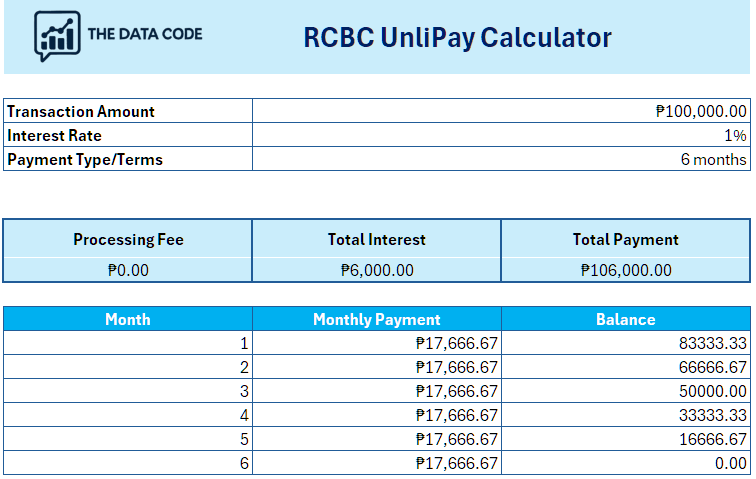
Once downloaded, you can edit the fields as needed and instantly see how your total cost changes depending on the amount, term, or interest rate.
Don’t have an RCBC credit card yet?
Explore Credit Cards By Bank