In 2026, Security Bank continues to be a trusted choice for Filipinos looking for simple, competitive, and lifestyle-focused credit cards. As one of the country’s established universal banks, Security Bank has steadily strengthened its retail banking presence, offering financial products designed for modern consumers who value convenience, rewards, and flexibility.
From straightforward rewards cards and generous cashback options to travel-oriented and premium credit cards, Security Bank’s lineup is built to match different spending habits and financial priorities.
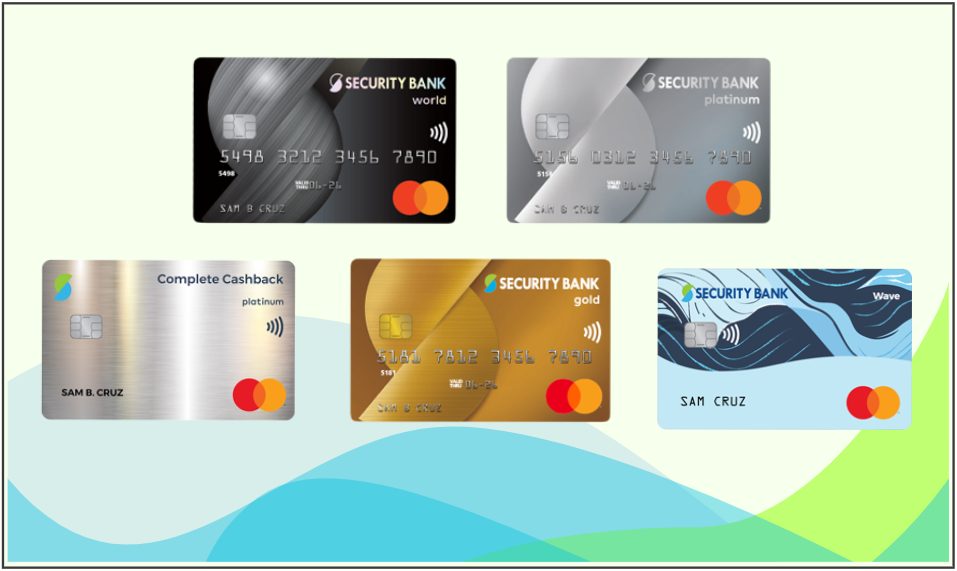
Security Bank Credit Cards Features, Annual Fees, and Minimum Income Requirements
If you’re looking for generous cashback, travel perks, shopping rewards, or exclusive lifestyle privileges, Security Bank offers a selection of credit cards designed to complement your spending habits and financial priorities.
Let’s take a closer look at the features, benefits, and important considerations to help you choose the right Security Bank credit card for your lifestyle in 2026.
- Security Bank Credit Cards Features, Annual Fees, and Minimum Income Requirements
- Security Bank Credit Cards For Travel
- Security Bank Credit Cards For Cashback
- Security Bank Credit Cards For Rewards
- Security Bank Credit Cards Comparison Table
- How to Choose the Right Security Bank Credit Card
- How to Apply for a Security Bank Credit Card
- Frequently Asked Questions (FAQs)
Security Bank Credit Cards For Travel
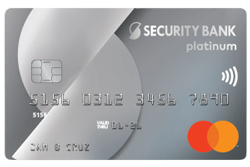
Benefits
- 2 BetterBanking points = ₱20 spend
- 2 complimentary airport lounge access
- Free travel insurance
- E-commerce purchase protection
- Exclusive Mastercard promos
- Dual currency billing option
Eligibility
- Minimum Income: ₱780,000
- Annual Fee:
- Principal: ₱4,000
- Supplementary: NAFFL
- Forex Fee: 2.5%
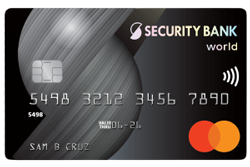
Benefits
- 3 BetterBanking points = ₱20 spend
- 6 int’l airport lounge access
- Unlimited local lounge access (A Lounge, Marhaba, PAGSS)
- Up to $100k travel insurance
- E-commerce purchase protection
- Exclusive Mastercard promos
- Dual currency billing option
Eligibility
- Minimum Income: ₱3,000,000
- Annual Fee:
- Principal: ₱5,000
- Supplementary: NAFFL
- Forex Fee: 2.5%
Security Bank Credit Cards For Cashback
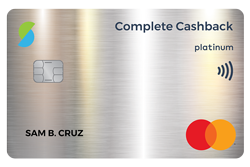
Benefits
- 5% cashback on groceries
- 4% cashback on gas
- 3% cashback on utilities
- 2% cashback on dining
- 1% cashback on shopping
- Local airport lounge access (preferential rate)
- E-commerce purchase protection
- Exclusive Mastercard promos
Eligibility
- Minimum Income: ₱780,000
- Annual Fee:
- Principal: ₱3,000
- Supplementary: ₱1,500
- Forex Fee: 2.5%
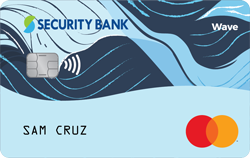
Benefits
- No annual fee for life
- 1% cashback on online spending
- Local airport lounge access (preferential rate)
- E-commerce purchase protection
- Exclusive Mastercard promos
Eligibility
- Minimum Income: ₱360,000
- Annual Fee:
- Principal: NAFFL
- Supplementary: NAFFL
- Forex Fee: 2.5%
Security Bank Credit Cards For Rewards
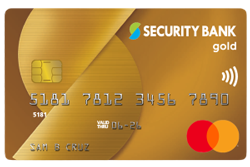
Benefits
- 1 BetterBanking point = ₱20 spend
- Local airport lounge access (preferential rate)
- Exclusive Mastercard promos
Eligibility
- Minimum Income: ₱480,000
- Annual Fee:
- Principal: ₱2,500
- Supplementary: NAFFL
- Forex Fee: 2.5%
Still undecided? You can also explore our interactive comparison table featuring Security Bank credit cards, where you can filter options based on key features such as cashback, rewards programs, travel benefits, and even cards with waived annual fees.
Looking specifically for cards with complimentary lounge access or No Annual Fee for Life (NAFFL) promos? Simply use the dropdown filters to instantly narrow down your options and find the Security Bank credit card that best fits your needs.
Security Bank Credit Cards Comparison Table
| Credit Card | Rewards | Cashback | Lounge Access | Travel Insurance | Annual Fee | 1st Supplementary | Forex Fee |
|---|---|---|---|---|---|---|---|
| SB Platinum Mastercard | ✅ | ❌ | ✅ | ✅ | ₱4,000 | NAFFL | 2.50% |
| SB World Mastercard | ✅ | ❌ | ✅ | ✅ | ₱5,000 | NAFFL | 2.50% |
| SB Complete Cashback | ❌ | ✅ | ✅ | ❌ | ₱3,000 | ₱1,500 | 2.50% |
| SB Wave Mastercard | ❌ | ✅ | ✅ | ❌ | NAFFL | NAFFL | 2.50% |
| SB Gold Mastercard | ✅ | ❌ | ✅ | ❌ | ₱2,500 | NAFFL | 2.50% |
How to Choose the Right Security Bank Credit Card
With a more streamlined lineup compared to larger banks, choosing the right Security Bank credit card is easier when you focus on your spending habits and financial goals.
- For Rewards: If you want to earn points on your everyday purchases, consider the Security Bank Platinum Mastercard or Security Bank World Mastercard. These cards are ideal for cardholders who prefer redeemable rewards, travel perks, and premium privileges.
- For Cashback: If you’d rather earn automatic rebates instead of points, the Security Bank Complete Cashback and Security Bank Wave Mastercard are strong options. They’re suited for frequent spenders who want straightforward savings on essentials and lifestyle purchases.
- For Travel: Travelers may benefit from the Security Bank Platinum Mastercard or World Mastercard, both of which offer lounge access and travel-related perks that add comfort and protection to your trips.
- For Simplicity or NAFFL Seekers: If you prefer a card with no annual fee for life, the Security Bank Wave Mastercard is a practical choice. It’s a good option for those who want cashback and digital-friendly features without worrying about yearly fees.
How to Apply for a Security Bank Credit Card
Applying for a Security Bank credit card online is a convenient process that typically takes a few minutes, provided you have your documents ready.
You can complete the entire process online by submitting your application through their website.
- Visit the Security Bank credit card online application form.
- Choose your desired card type.
- Fill in your personal information, including your ID and ID number.
- Make sure to use a valid number because you need to verify it with an OTP.
- Complete your address details, employment details, and card details.
- Upload the required documents and submit.
- Monitor your email and phone in case Security Bank contacts you for additional details or documents.
Security Bank-Accepted Proof of Identity
- Phil ID/ePhil ID
- Passport
- Voter’s ID
- SSS/GSIS ID/UMID
- Driver’s License
- Plastic PRC ID
- Postal ID
If you don’t have these primary IDs, you can try submitting any two of the secondary IDs below. Acceptance is subject to individual branch policy.
- Barangay Certificate
- City Health Card
- Company ID
- DSWD Certification
- GOCC ID (e.g., AFP ID, HDMF ID)
- NBI Clearance
- OFW ID
- OWWA ID
- Pag-IBIG Loyalty Card
- PhilHealth ID
- Police Clearance
- Seaman’s Book
- TIN
- Digital TIN
- Postal ID (Paper-Based)
Security Bank-Accepted Proof of Income
If employed:
- Latest income tax return (ITR) duly stamped by BIR
- BIR Form 2316
- Latest month’s payslip
- Certificate of Employment (COE) indicating status, service tenure, and compensation breakdown
If self-employed:
- Latest income tax return (ITR) duly stamped by BIR and 2-year audited financial statement
- Registration of business Name from DTI or SEC
Preparing these documents ahead of time can make your application process faster and smoother.
Frequently Asked Questions (FAQs)
1. How do I redeem Security Bank BetterBanking Points?
Register and Log In. Create an account and enroll your Security Bank credit card on the official rewards portal. Once registered, log in to access the rewards catalog.
Choose Your Rewards. Browse the catalog and select the items or digital rewards you want. Add your chosen rewards to your cart, and make sure everything is updated before proceeding.
Checkout and Confirm. Complete the checkout process to finalize your redemption. Once confirmed, you can expect your physical reward or digital gift to be delivered based on the fulfillment timeline.
2. Do Security Bank BetterBanking Points expire?
No, your BetterBanking Points do not expire as long as your credit card account remains active and current. Once your credit card is closed or canceled, any unused points will no longer be valid.
3. Is there a minimum income requirement to apply for a Security Bank credit card?
Yes, each card has its own income requirement listed in the individual card information above. The income requirement for Security Bank credit cards ranges from ₱360,000 to ₱3,000,000 per month.
4. How long does the application process take?
Online applications typically take 7 to 15 banking days to process. If documents are complete and you meet the eligibility criteria, approval may be faster. You’ll be notified via SMS or email once your card is approved and dispatched.
5. How to lock/unlock your Security Bank credit card?
When not in use, it is best to keep your Security Bank credit card locked. To do this, open your Security Bank app, scroll to the credit card section, and select the card you wish to lock/unlock. Go to the Manage tab and toggle the Lock Card button. Read the prompt and click Continue.
Follow the same steps to unlock your card. You may be asked to provide an OTP.
6. Can I request a supplementary card?
Yes, qualified principal cardholders may apply for up to 5 supplementary credit cards. Applications may be submitted through a Security Bank branch, via telesales, or through the official Security Bank website. Approval is still subject to evaluation.
Only the first approved supplementary card may qualify for a waived annual fee for life, depending on the promo terms. The principal cardholder remains responsible for all charges made by the supplementary cardholder.
7. How do I track my Security Bank credit card delivery?
To check the status of your credit card application, you can visit Security Bank’s Application Status Inquiry and input your reference number and last name.
8. How do I activate my Security Bank credit card?
You can activate your card through any of the following methods provided by Security Bank:
Via the Security Bank App: Open the app and tap “Activate Card” on the home screen. Enter your card’s CVV, tap Submit, then enter your TPIN. You’ll see a confirmation message once your card has been successfully activated.
Via SMS: Using your registered mobile number, text SBCARDS ACTIVATE (Birthdate mmddyy)/(ExpiryDate mmyy)/(Last 4 digits of card) to 2086 for Globe/TM or 4629 for Smart/TNT. Example: SBCARDS ACTIVATE 052274/1226/6813
Via Customer Service Hotline: Call (02) 8887-9188, then press 2, 1, 5, and 4 to proceed with card activation.
9. Where can I pay my Security Bank credit card bill?
There are many options to pay for your Security Bank credit card bill.
If you prefer to use your Security Bank online or mobile app, link your credit card to your savings or checking account for easy online payments.
Other payment options include:
Physical Payment Channels
- Security Bank Branch (find the nearest one)
- Security Bank ATM
- Bayad Center
- Cebuana Lhuillier
- SM Payment Counters
- EC Pay Partner Outlets (e.g., 7-Eleven)
Online Payment Channels
- Coins.ph
- GCash
- PayMaya
- Bayad App
Payment can take up to 3 days to be posted, so make sure to settle your credit card bill in advance. That way, you’ll avoid late payment charges and keep your credit record in good standing.
Explore Credit Cards By Bank