With tensions escalating due to the ongoing conflict in the Middle East, global oil markets remain volatile. Historically, geopolitical instability in oil-producing regions directly impacts pump prices in the Philippines. For motorists, this means one thing: unpredictable fuel price hikes.
Instead of waiting for the next increase, you can now lock in fuel at today’s price and redeem it later through PriceLOCQ and partner stations of SEAOIL.
This strategy allows you to:
- Buy fuel in advance at current prices
- Stack per-liter discounts (up to ₱5/L)
- Redeem when prices spike
- Avoid panic buying
Think of it as prepaid fuel stored digitally, not physically.
What Is PriceLOCQ and How Does It Work?
PriceLOCQ is a mobile app that lets users purchase fuel liters at today’s price, store them in a “Liter Balance”, and redeem later at participating SEAOIL stations
You are not physically storing gasoline at home. Instead, you’re locking in the price and redeeming via QR code when needed.
3 Ways to Get Fuel Discounts
As of Q1 2026, there are three main ways to maximize savings:
Option 1: RCBC Credit Card Discount (Up to ₱5/L)
If you’re an RCBC Mastercard or Visa credit cardholder in good standing, you can get:
- ₱2/L off on Diesel
- ₱4/L off on Gas 91
- ₱4/L off on Gas 95
- ₱5/L off on Gas 97
- Capped at 150 liters per month
- No minimum top-up required
This promo is available until May 15, 2026, in all participating SEAOIL stations.
How to Avail:
- Go to the Top-Up Liter Balance page in the app
- Select your RCBC credit card as payment method
- Discount applies automatically
- Redeem via Scan to Pay (Liters)
⚠️ Cannot be combined with other SEAOIL or PriceLOCQ promos unless stated.
Option 2: Atome Fuel Discount (₱5/L)
Users with a valid Atome account can enjoy:
- ₱2/L off on Diesel
- ₱4/L off on Gas 91
- ₱4/L off on Gas 95
- ₱5/L off on Gas 97
- Capped at 120 liters per month
- No minimum top-up required
This promo is available until October 14, 2026, in all participating SEAOIL stations.
How to Avail:
- Download the PriceLOCQ app
- Register your account
- Choose Atome as payment method
- Top up your Liter Balance
Discount applies upon successful top-up and redemption.
⚠️ Cannot be combined with other SEAOIL or PriceLOCQ promos unless stated.
Option 3: LOCQPay Everyday Discount (Automatic Per-Liter Savings)
Paying directly using LOCQPay Balance unlocks automatic pump price discounts at participating stations. This option is recommended if you want to use credit cards from other banks and you are planning to gas up soon. However, while this option gives you a discount, it does not allow you to store fuel in the app.
Discount tiers vary by station:
- ₱5/L gasoline & ₱2/L diesel
- ₱4/L gasoline & ₱2/L diesel
- ₱3/L gasoline & ₱2/L diesel
This promo is available until March 31, 2026, in all participating SEAOIL stations.
Important Details:
- Max 80 liters per day
- Up to 3 redemptions per day
- Must select “LOCQPay Balance” under Scan to Pay
- Not valid with cash, credit/debit card, GCash, Maya, gift cards, etc.
- Cannot be combined with other fuel promos
Why Locking in Fuel Now Makes Financial Sense
With oil prices reacting quickly to global developments, especially in the Middle East, even a ₱2–₱3 per liter increase can significantly affect daily commuters, ride-hailing drivers, delivery riders, and logistics businesses.
By locking in 150 liters at ₱5/L discount, you could save up to ₱750 per month. Multiply that over several months of price volatility, and the savings compound.
When Should You Use Each Discount?
| Situation | Best Option |
|---|---|
| You have an RCBC credit card | RCBC ₱5/L promo |
| You prefer Buy Now, Pay Later | Atome ₱5/L promo |
| You’re redeeming at the pump | LOCQPay Everyday Discount |
Remember: these promos cannot usually be stacked together, so choose strategically.
How to Top Up Your PriceLOCQ Liter Balance (Step-by-Step Guide)
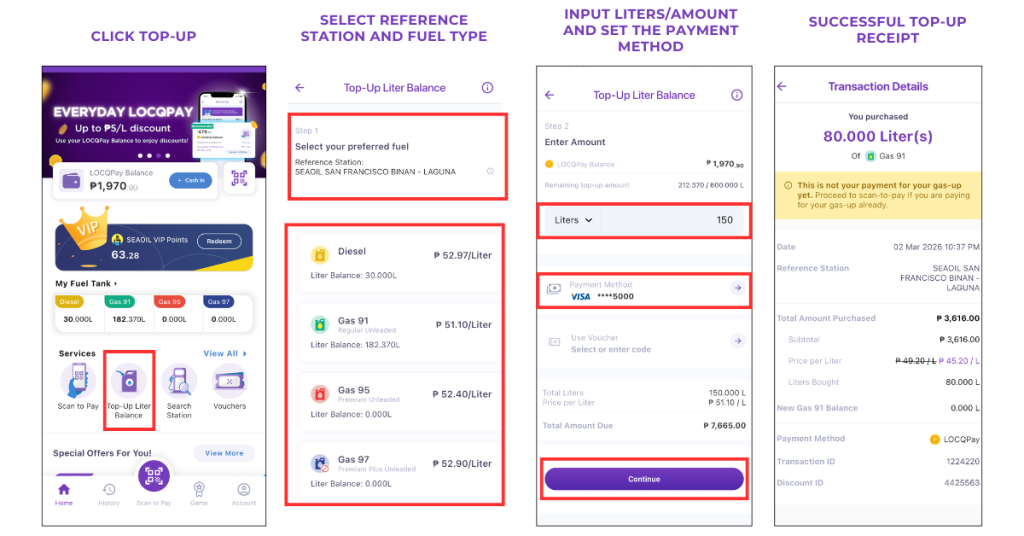
1. Download the PriceLOCQ app and sign in.
2. On the main dashboard, click Top-Up Liter Balance.
3. If this is your first time using PriceLOCQ, you will be asked to select a reference station. Choose one that is both near you and offers the cheaper prices. This reference station will only be used in setting your base price. You don’t necessarily have to redeem your fuel from here.
If this is not your first time using PriceLOCQ, your reference station will be automatically set to the last station you topped up at.
4. Choose your preferred fuel. At this point, you will see the regular prices, not yet discounted.
5. Enter how many liters, or how much worth of fuel, you are purchasing.
6. Select your payment method. As recommended in this article, RCBC credit cards and Atome have ongoing promos. of up to ₱5.00/L discount. After selecting the correct payment method, you will then see the discounted price. Double-check the prices to ensure that the discount is reflected.
7. Input the voucher if you have any.
8. Click Continue to complete the top-up.
Final Thoughts
Fuel price hikes are often reactive and sudden. Instead of adjusting your budget after the increase, you can prepare ahead.
By using PriceLOCQ together with SEAOIL and maximizing promos from RCBC or Atome, you turn fuel volatility into a financial advantage.
In uncertain times, locking in essentials like fuel isn’t just smart, it’s strategic.
Related Posts
UnionBank Shell Power Visa: Up To 5% Fuel Rebate
UniOil x EastWest ₱7 Fuel Discount (2026): Save on Gas Nationwide
How to Lock In Fuel Prices: Save Up to ₱5/L with PriceLOCQ & SEAOIL
Explore Credit Cards By Bank