SPayLater doesn’t show you one fixed rate, it shows a range. This calculator gives you a quick way to see both ends of that range, your minimum possible cost and your maximum possible cost, before you confirm a purchase. It splits out the interest charge and the processing fee separately, so you can see exactly where each peso is going.
For the full breakdown of how SPayLater’s rates, billing cycle, and fees work, read our complete SPayLater guide here.
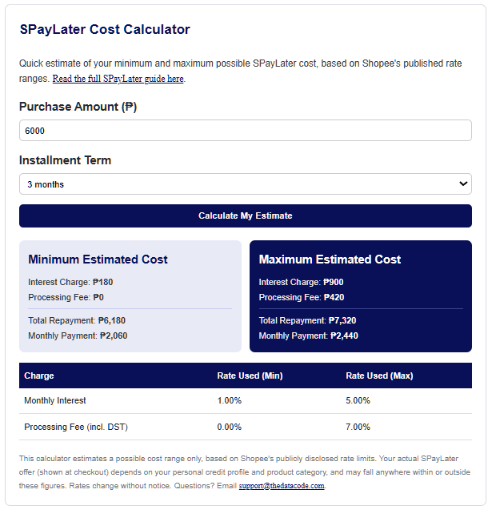
SPayLater Cost Calculator
Quick estimate of your minimum and maximum possible SPayLater cost, based on Shopee’s published rate ranges. Read the full SPayLater guide here.
This calculator estimates a possible cost range only, based on Shopee’s publicly disclosed rate limits. Your actual SPayLater offer (shown at checkout) depends on your personal credit profile and product category, and may fall anywhere within or outside these figures. Rates change without notice. Questions? Email support@thedatacode.com.
How to Use This Calculator
- Enter your purchase amount. This is the price of the item you’re planning to buy on Shopee, in pesos.
- Select your installment term. Choose how many months you’d like to spread the payment across, 1, 3, 6, 9, or 12 months.
- Tap “Calculate My Estimate.” You’ll see two cards: your minimum estimated cost and your maximum estimated cost.
- Check the rate table below the cards. It shows the exact interest rate and processing fee percentage used for each scenario, so you know which numbers built your total.
- Compare against your actual checkout offer. Shopee will show you your real rate once you select SPayLater at checkout. Use that number, not the range here, for your final decision.
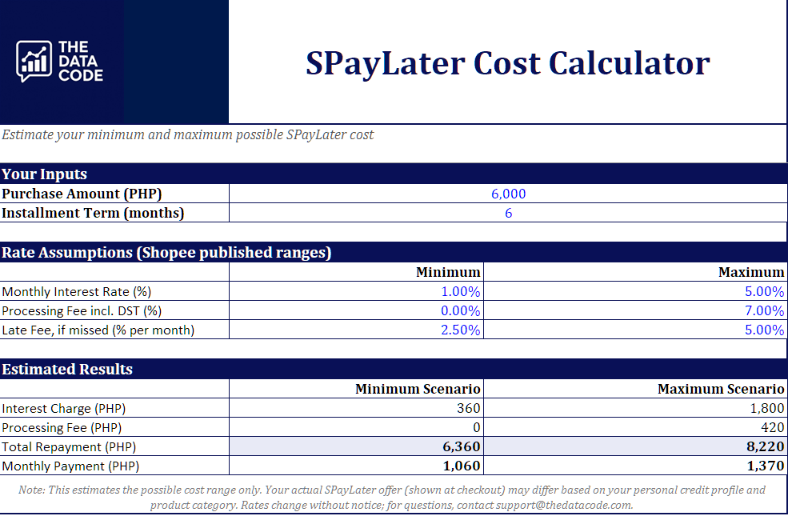
Download the Excel Version
Prefer to run your own numbers offline, or test a few different purchase amounts at once? Download the free Excel version below.
Just enter your purchase amount and term in the highlighted cells, and the minimum and maximum totals update automatically.
Final Thoughts
This calculator gives you a range, not a guarantee. Shopee bases your actual rate on your credit profile and the product category you’re buying, so your real offer could land anywhere between the minimum and maximum shown here, or occasionally outside it during a promo. Use this tool to set expectations before you shop, then confirm the exact figure on your checkout screen before you commit.
For tips on deciding whether SPayLater is the right move for a specific purchase, and how it compares to other BNPL options in the Philippines, check out our full SPayLater guide here.
Disclaimer: This calculator estimates a possible cost range based on Shopee’s publicly disclosed rate limits, current as of June 2026 and subject to change without notice. For questions, reach out to support@thedatacode.com.
Related Articles

Salary Deductions Calculator: Tax, SSS, PhilHealth, Pag-IBIG

Free Pag-IBIG Contribution Calculator for Employees

What Is SPayLater and How Much Does It Really Cost?
Digital Bank Interest Calculator
SPayLater Calculator: Estimate Your Minimum and Maximum Cost