SPayLater is Shopee’s buy now, pay later (BNPL) feature that lets you split your purchases into installments instead of paying the full amount upfront. It charges a monthly interest rate of 1% to 5%, a processing fee of 0% to 7% (this already includes the Documentary Stamp Tax, a small government tax on loan transactions), and a late fee of 2.5% to 5% per month if you miss a payment.
In simple terms, SPayLater works like a credit card built into your Shopee app, except instead of a credit card number, you get a credit line tied to your account. The exact rate you get depends on your personal credit profile and the product category you’re buying, so two people buying the same item can end up with different total costs.
What Exactly Is SPayLater?
SPayLater is operated by Monee (Credit) Finance Philippines, Inc., a company regulated by the Securities and Exchange Commission (SEC), the government agency that oversees lending and financing companies in the country. It is offered directly inside the Shopee app, so you don’t need a separate account or app to use it.
Once you’re approved, you get a credit limit you can use at checkout. You can then choose to pay later in full, or split the purchase into an installment plan of up to 12 months. There’s also a related product called SLoans, which lets you withdraw a portion of your credit line as actual cash, something SPayLater itself does not allow.
You can only use SPayLater for purchases made on Shopee. It’s not a general-purpose credit line you can use outside the platform.
How Much Does SPayLater Cost?
There are three charges to watch out for. Here’s a breakdown of each one:
| Charge | Typical Range | When It Applies |
|---|---|---|
| Monthly interest rate | 1% to 5% | Charged on your remaining principal for every month of your installment term |
| Processing fee (includes DST) | 0% to 7% | Charged once, when your order is completed |
| Late payment fee | 2.5% to 5% | Charged monthly on your overdue balance if you miss a due date |
Shopee does not publicly disclose the exact rate you’ll get. It depends on your credit profile (your repayment history, account activity, and how long you’ve used Shopee) and on the product category you’re buying. This is why two shoppers buying the same ₱5,000 phone case can see different total costs on their SPayLater offer.
This is also why we can’t give you one single “true cost” number for SPayLater. What we can do is walk you through the actual formula Shopee uses, so you can plug in the rate shown on your own checkout screen and know exactly what you’re paying.
Here’s how the math works, based on Shopee’s own help center formula:
- Loan Principal is the price of the item you’re buying. Let’s say it’s ₱1,000.
- Interest is calculated by multiplying your loan principal by your monthly interest rate, then by the number of months in your installment plan. If your rate is 3.95% per month over 3 months, that’s ₱1,000 x 3.95% x 3 = ₱118.50 in total interest.
- Processing fee is a fixed percentage of your principal, charged once. At a 5% rate, that’s ₱1,000 x 5% = ₱50.
- If no fixed processing fee applies, the Documentary Stamp Tax (DST) still gets added on its own, computed as 1/200 (0.5%) of your principal.
Add the principal, interest, and processing fee together, and you get your total repayment amount, which then gets divided across your chosen number of months.
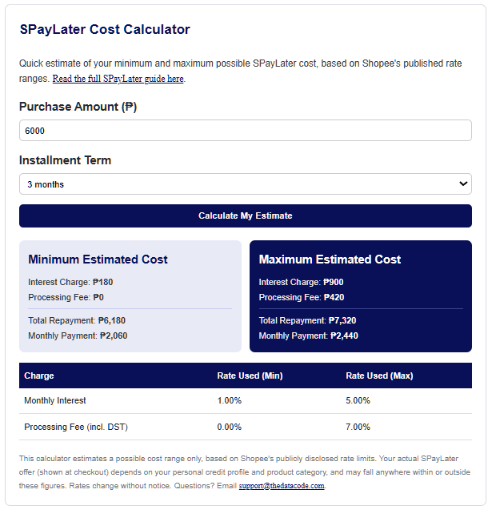
If all these calculations sound too much, you can use our built-in SPayLater calculator instead.
How Does the SPayLater Billing Cycle Work?
When you first activate SPayLater, you’re assigned a billing cycle that starts on either the 5th or the 25th of the month. Your due date follows from that: either the 5th or the 15th, depending on which cycle you landed on.
Once your account is activated, you cannot change your assigned billing date. So if your cycle doesn’t line up well with your payday, your best move is to build a reminder into your calendar rather than wait for Shopee to let you switch it later (you can’t).
How Do You Activate and Use SPayLater?
Activating SPayLater takes just a few minutes if you’re eligible. Here’s the step-by-step process:
- Open the Shopee app and go to the Me tab.
- Tap SPayLater.
- Tap Activate Now.
- Enter the one-time PIN (OTP) sent to your registered mobile number.
- Fill out the required personal information.
- Complete the facial verification step (this confirms you’re a real, unique applicant).
- Wait for Shopee’s notification on whether you’ve been approved, usually within the same day.
Once approved, using SPayLater is just as simple:
- Shop as usual and proceed to checkout.
- Under payment method, select SPayLater.
- Choose your installment term (you’ll see the interest rate and fees for that specific offer before confirming).
- Confirm your order.
To pay your monthly due, open your SPayLater wallet from the Me tab, tap Pay Now beside the amount due, choose your payment method, and confirm.
Sample Cost Scenarios in Pesos
Let’s say you’re earning around ₱18K/month and you’re eyeing a ₱6,000 air fryer during a Shopee sale. Here’s roughly what your installment could look like across different terms, using a mid-range estimate of 3% monthly interest and 3% processing fee (your actual offer may show different numbers, so always check your own checkout screen):
| Term | Total Interest | Processing Fee | Total Repayment | Monthly Payment |
|---|---|---|---|---|
| 3 months | ₱540 | ₱180 | ₱6,720 | ₱2,240 |
| 6 months | ₱1,080 | ₱180 | ₱7,260 | ₱1,210 |
| 12 months | ₱2,160 | ₱180 | ₱8,340 | ₱695 |
Notice the pattern: the longer your term, the lower your monthly payment, but the higher your total cost. A 12-month plan on this example costs you ₱1,620 more overall than the 3-month plan, just in extra interest.
If you see a 0% interest badge on an item, that changes the math entirely. The 0% applies only to the interest line, but processing fees and DST may still apply depending on the specific promo, so it’s still worth reading the fine print on the item page before checking out.
Is SPayLater Worth It?
SPayLater can be a genuinely useful tool if you use it the way it’s meant to be used: for planned purchases you can comfortably pay off, not as a way to buy things you couldn’t otherwise afford.
It tends to work well when:
- You’re buying something you already budgeted for, like an appliance or a back-to-school gadget, and you’d rather spread the cost than drain your savings in one go
- You qualify for a 0% interest promo item
- You’re confident you’ll hit every due date, since your billing cycle can’t be changed once set
It tends to backfire when:
- You’re using it to buy things outside your usual budget just because the upfront cost feels smaller
- You’re already juggling other installment plans or loans, since the late fee of 2.5% to 5% per month compounds quickly on an overdue balance
- You don’t check the specific rate shown on your checkout screen before confirming, since rates vary by item and by your own credit profile
SPayLater vs Other BNPL Options
SPayLater isn’t the only BNPL option available to Filipino shoppers. The right pick really depends on where you’re shopping. SPayLater only works inside the Shopee app, while options like BillEase and Home Credit can be used across a wider network of partner merchants, both online and in physical stores.
Read our full BNPL comparison guide here for a detailed breakdown of how SPayLater stacks up against BillEase’s Pay with Grace and Regular plans, plus other major providers.
Tips to Avoid Extra Fees
- Always check your specific offer before confirming. Your rate is shown right on the checkout screen for that item, before you commit.
- Mark your due date the moment you activate. Since you can’t change your billing cycle later, building the habit early saves you from late fees down the line.
- Pay in full when you can. If you have the cash on hand, paying off your balance early or in one go avoids interest accumulating across multiple months.
- Don’t stack multiple SPayLater purchases at once if you’re not confident you can track all the due dates and amounts.
- Compare the installment cost to paying upfront. Sometimes paying in full is genuinely cheaper than splitting it, especially on smaller purchases where the processing fee eats into any benefit.
Final Thoughts
SPayLater is a convenient, regulated way to spread out the cost of a Shopee purchase, but the actual cost varies from person to person and item to item. The safest approach is to treat the rate shown on your checkout screen as the real number, not the general range you see in guides like this one (including ours), and to only use it for purchases you’ve already planned for.
If you’re trying to decide between SPayLater and another BNPL provider, our full comparison guide walks through how the fees and terms differ across the major options available in the Philippines.
Disclaimer: Rates and fees mentioned in this article are based on publicly available ranges from Shopee’s help center and may change without notice. Always check the specific rate shown on your own checkout screen before confirming a purchase. For questions, reach out to support@thedatacode.com.
Related Articles
Grid

Government Salary Deductions: Complete Guide With Calculator

Salary Deductions Calculator: Tax, SSS, PhilHealth, Pag-IBIG

Pag-IBIG Contribution: Your Complete Guide With Calculator

Free Pag-IBIG Contribution Calculator for Employees

PhilHealth Contribution Guide: Rates and Calculator