Yes, you can order your PSA birth, marriage, death, CENOMAR, or CENODEATH certificate online without leaving your house. You just need to go to the official PSA online channel, fill out the request form, pay online, and wait for delivery to your doorstep.
If you have ever lined up at a PSA branch only to be told to come back another day, you know how much time this online option saves you. In this guide, we will walk you through exactly how to place your order, how much it costs, how long delivery takes, and how to track it once it is on the way.
What Is PSA Online Ordering?
PSA online ordering means requesting your civil registry documents (birth certificate, marriage certificate, death certificate, CENOMAR, or CENODEATH) through the internet instead of lining up at a PSA office. The Philippine Statistics Authority (PSA, formerly NSO) has two authorized online channels for this: PSA Serbilis and PSAHelpline. Both process your request, print your certificate on official security paper (SECPA) with a QR code, and have it delivered straight to your address.
In simple terms, you are skipping the queue. You place the order from your phone or laptop, pay online, and a courier brings the document to you.
What Documents Can You Order Online?
You can request the following through the official PSA online channels:
- Birth Certificate (for yourself, your child, or your parent)
- Marriage Certificate
- Death Certificate
- CENOMAR (Certificate of No Marriage Record, used to prove you have never been married)
- CENODEATH (Certificate of No Death Record)
You can also get a PSA E-Certificate, which is a digitally signed PDF version of these same documents. This is handy if you need something urgently, like for school enrollment, since you get it instantly instead of waiting for courier delivery.
How to Order Your PSA Certificate Online
Here is the process, step by step:
1. Go to the official website. Use either psahelpline.ph or psaserbilis.com.ph. These are the two authorized PSA online partners.
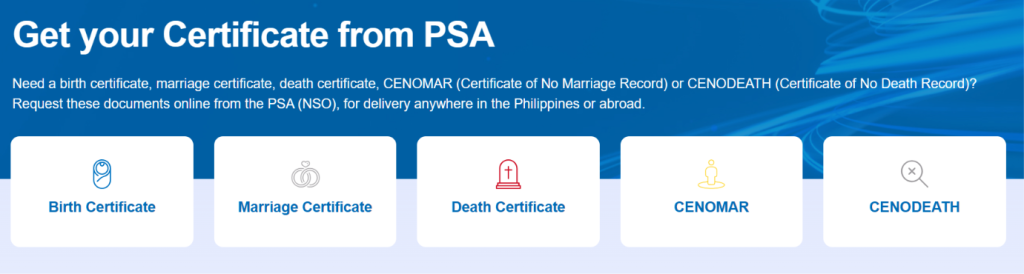
2. Choose your document type. Select whether you need a birth certificate, marriage certificate, death certificate, CENOMAR, or CENODEATH.
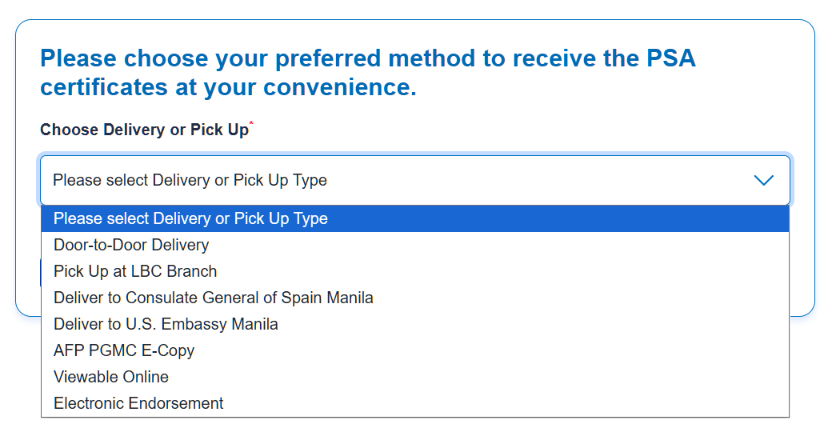
3. Choose how you want to receive it. Options include nationwide door-to-door delivery, pickup at partner branches like National Book Store or Robinsons Department Store, international delivery, or the digital E-Certificate.
4. Fill out the requester’s details. Enter the complete details of the person requesting the certificate.
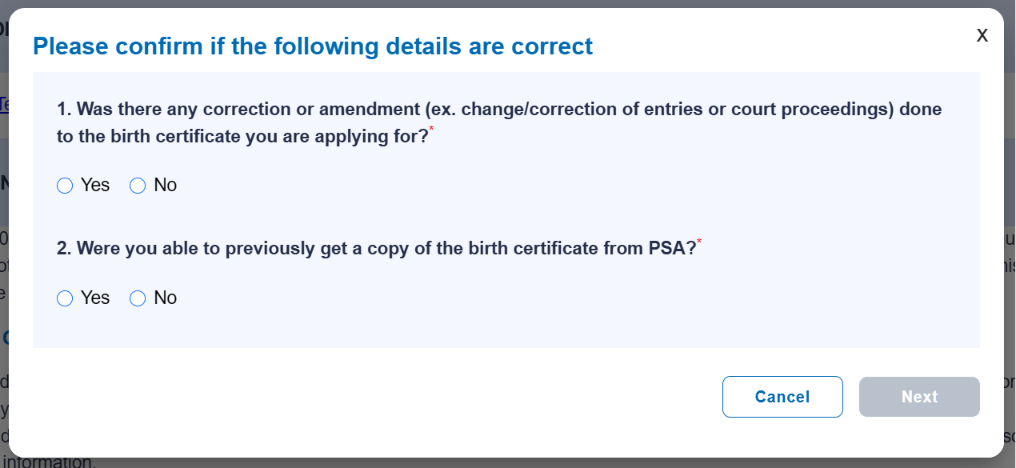
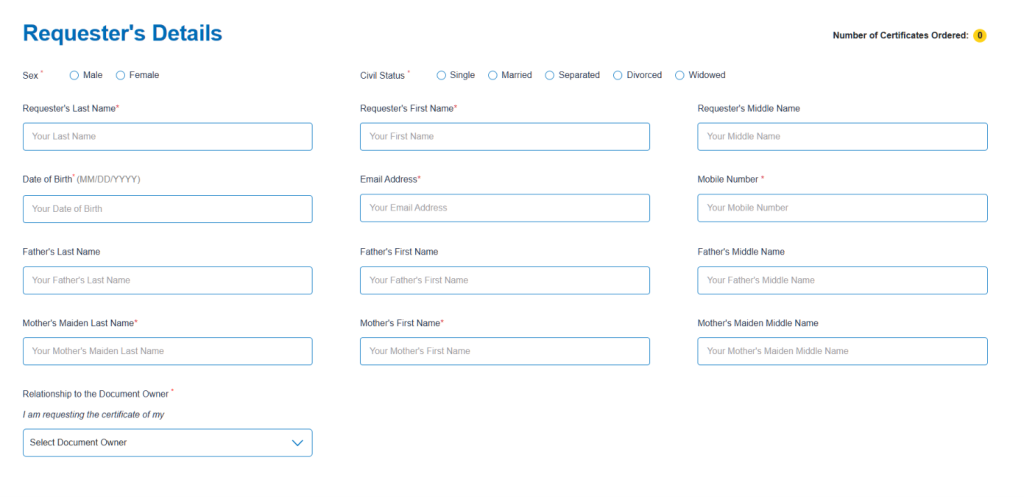
5. Fill out the request form if the requester is different from the certificate owner: Enter the complete details of the person named on the certificate: full name, date of birth (or marriage or death), and place of registration. Double-check the spelling, since a single wrong letter can delay your request.
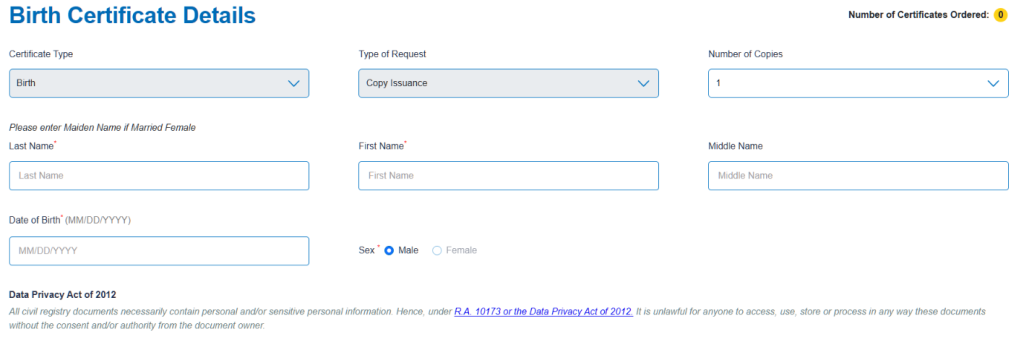
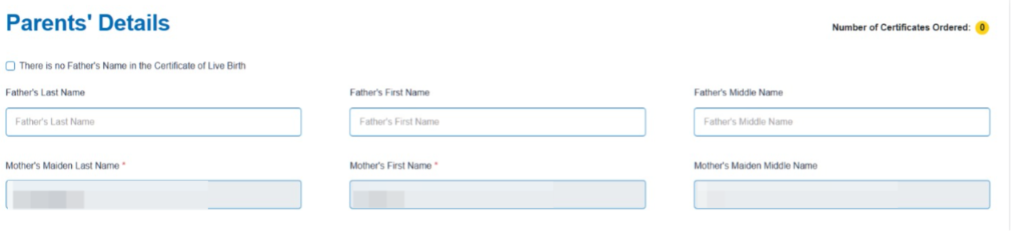

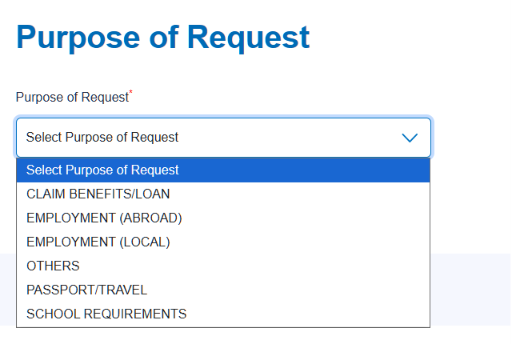
6. Confirm the details. Review the summary and confirm once all details are correct.
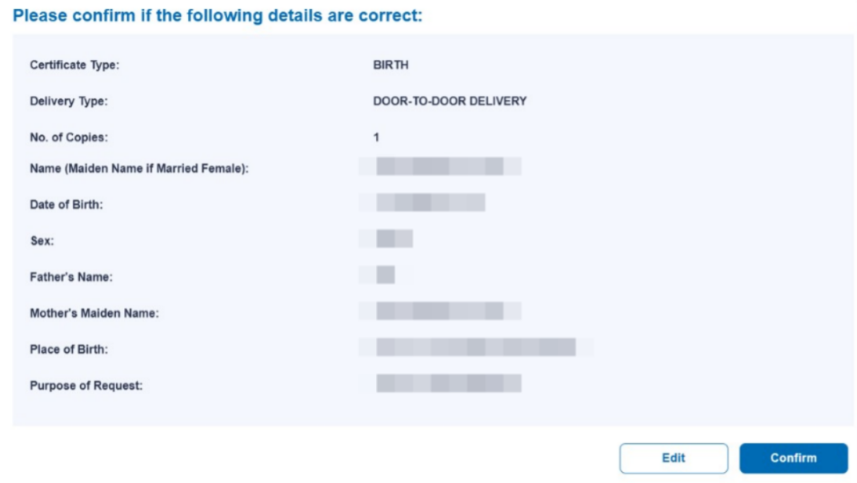
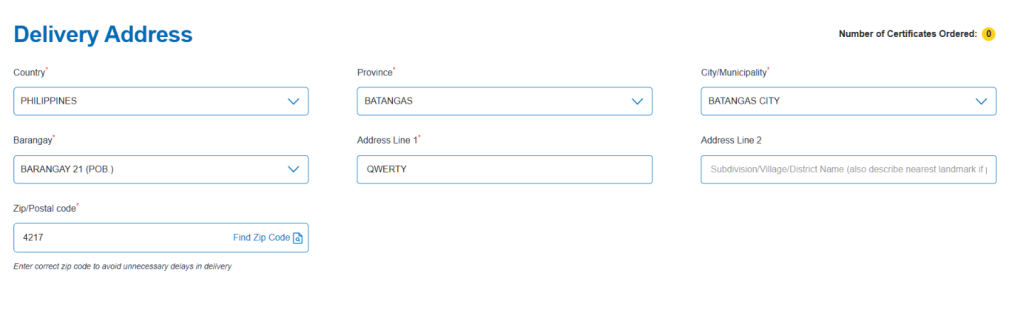
7. Fill out the delivery details. Input the address where you want the document to be shipped.
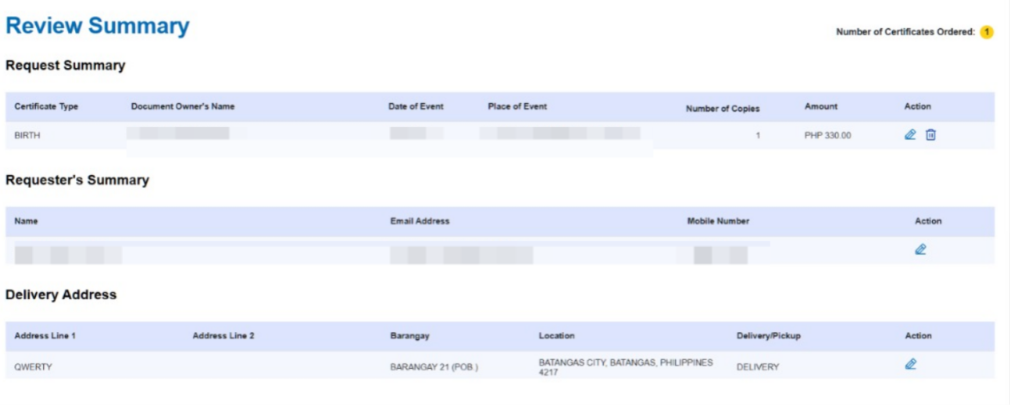
8. Review the summary. Check if all the details are correct. Click Confirm once satisfied with the information. Proceed to Payment to finalize the order.
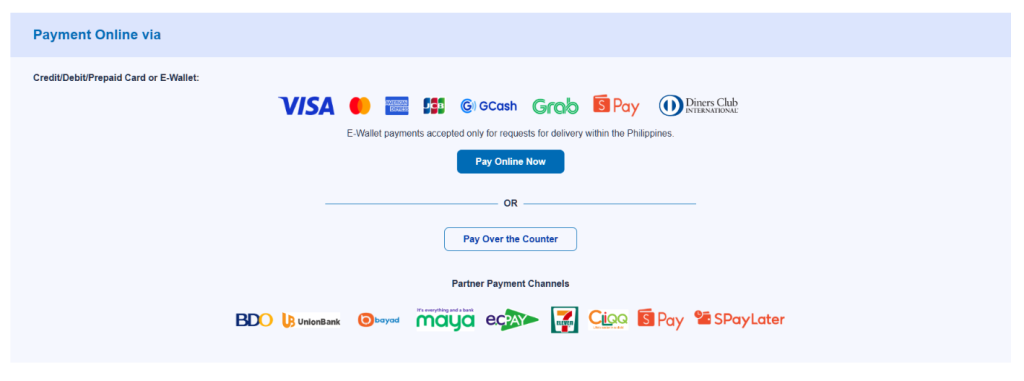
9. Pay online. Choose from GCash, Maya, credit or debit card, QR Ph, 7-Eleven, or other available payment channels.
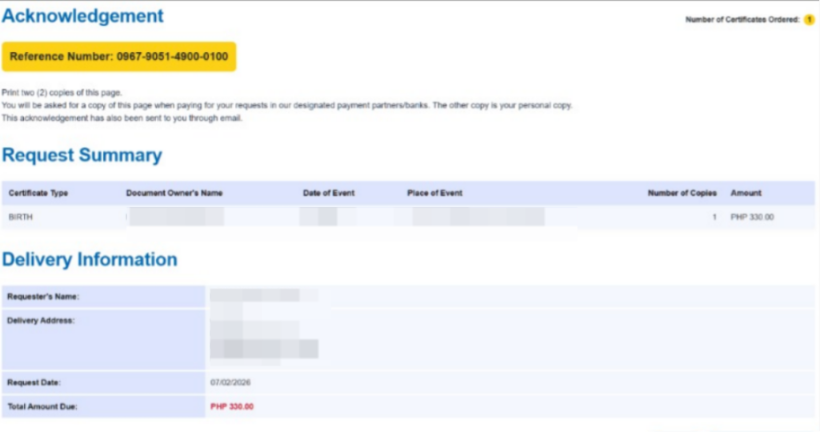
10. Wait for delivery or download. You will get a reference number by email and SMS. Use this to track your order until it arrives, or download it right away if you chose the E-Certificate option.
How Much Does It Cost?
Here is a quick breakdown of the current online rates (inclusive of service and courier fees):
| Document | Price |
|---|---|
| Birth Certificate | ₱365 |
| Marriage Certificate | ₱365 |
| Death Certificate | ₱365 |
| CENOMAR | ₱420 |
| CENODEATH | ₱420 |
Note: These are estimates based on published online rates and may change without notice. Choosing branch pickup instead of delivery can save you around ₱30. Always confirm the exact amount on the official site before paying.
How Long Will Delivery Take?
Let’s say you order your birth certificate today. Here is roughly what to expect:
| Location | Estimated Delivery |
|---|---|
| Metro Manila | 3 to 4 working days |
| Outside Metro Manila | 3 to 8 working days |
| Records needing manual verification | Add 7 working days |
Some orders take longer because PSA could not immediately find the record in its database and needs to pull it manually from archives. This is common for older records or documents registered late.
Do You Need a PSA Appointment?
No, you do not need to book a PSA appointment to order online. Appointments are only required if you plan to walk in and request your certificate in person at a PSA Serbilis outlet. Ordering through the official online channels skips this step entirely since you can request anytime, 24/7, from any device.
If you would rather book an in-person appointment or want to explore your options directly with PSA’s authorized channels, read our complete guide on booking a PSA appointment online.
Payment Options
You can pay for your PSA online order through:
- GCash
- Maya
- Credit or debit card (Visa/Mastercard)
- QR Ph
- 7-Eleven (over-the-counter)
- BancNet
- Dragonpay
How to Track Your Order
Once your payment is confirmed, you will receive a 10-digit reference number by email and SMS. Keep this safe, since it is your key to checking your order status.
- Go to the tracking page of the site you ordered from (PSAHelpline or PSA Serbilis).
- Enter your reference number along with your registered email or mobile number.
- Your current status will show immediately, and you will also get automatic SMS and email updates as your order moves through each stage.
Lost your reference number? Check your email inbox and spam folder first. If you still cannot find it, you can call PSAHelpline support at (02) 8737-1111, Monday to Saturday, 8 AM to 5 PM.
Common Mistakes to Avoid
- Misspelling names or dates. Even a small typo can trigger delays or a rejected request.
- Using an unauthorized third-party site. Only order through PSA Serbilis or PSAHelpline. Other sites claiming to process PSA documents may not be legitimate.
- Not assigning an Authorized Person to Receive. If you might not be home during delivery, assign someone in advance so your document is not returned.
- Forgetting your reference number. Screenshot or save it immediately after payment.
Frequently Asked Questions
Can I order a PSA certificate if I am abroad?
Yes. Select “International” as your delivery option, or ask a trusted relative in the Philippines to receive it on your behalf through the Authorized Person to Receive feature.
Can a minor order their own PSA certificate?
No. The requester must be of legal age. A parent or guardian can order on behalf of a minor.
What ID do I need to receive my delivery?
A valid government-issued ID such as a driver’s license, Philippine passport, SSS ID, or GSIS ID.
Is PSA E-Certificate accepted for school enrollment and other official use?
Yes, PSA E-Certificates are digitally signed and fully verifiable, making them valid for most official requirements.
What if my document needs manual verification?
This adds about 7 working days to your delivery time. It happens when your record cannot be immediately pulled from PSA’s database and needs to be retrieved from archives.
Final Thoughts
Ordering your PSA certificate online is faster, more convenient, and just as official as requesting in person, as long as you go through the authorized channels: PSA Serbilis or PSAHelpline. Have your details correct, keep your reference number safe, and you should have your document in hand within a few working days.
Related Articles
Visa x Google Pay ₱1,500 Cashback Promo: Complete Guide

Government Salary Deductions: Complete Guide With Calculator

Salary Deductions Calculator: Tax, SSS, PhilHealth, Pag-IBIG

Pag-IBIG Contribution: Your Complete Guide With Calculator

Free Pag-IBIG Contribution Calculator for Employees