
Grab Dine Out is a feature inside the Grab app that gives you discounts when you eat at partner restaurants. You either pay your bill through the app to get an instant discount, or buy a discounted voucher ahead of time and redeem it when you dine in. Grab has advertised savings of up to 20% off your bill, though the actual rate depends on the restaurant. In my personal experience, there are even restaurants offering 30% off! In simple terms, it is a built-in promo for eating out, not just for ordering delivery.
TL;DR on how to use it: Open the Grab app, go to Dine Out, pick a partner restaurant, and either pay your bill in the app for an instant discount or buy a voucher before you go. Discounts, partner restaurants, and terms change often, so always check the deal details in the app.
- What Is Grab Dine Out?
- Where Can You Use Grab Dine Out?
- How Do You Use a Dine Out Discount?
- How Do You Use a Dine Out Voucher?
- Discount or Voucher, Which Should You Pick?
- How Much Can You Really Save?
- Can You Earn GrabCoins With Dine Out?
- How Do You Get the Most Out of Dine Out?
- What Should You Watch Out For?
- Frequently Asked Questions
- Final Thoughts
- Related Articles
What Is Grab Dine Out?
Grab is best known for rides and GrabFood delivery. Dine Out extends the app to sit-down meals. It appears alongside delivery and pickup in the Grab app, and it lets you find restaurants, read reviews, and get deals before or during your meal.
There are two types of deals.
- Dine Out Discount is an instant discount on your total bill when you pay through the Grab app at the restaurant.
- Dine Out Voucher is a discounted voucher you buy in advance and redeem when you dine in. Some vouchers are bundled with chef-picked dishes.
Grab says the shift to dine-in reflects how many people returned to eating out after the pandemic. For restaurants, especially small and medium businesses, Dine Out brings in more customers. For you, it is a way to pay less for meals you were going to have anyway.
Where Can You Use Grab Dine Out?
When Grab launched Dine Out is available nationwide. Partner lists and cities keep changing, so the most reliable way to check is to open the Dine Out section in your Grab app and see which restaurants appear near you.
How Do You Use a Dine Out Discount?
Use this when you are already at the restaurant or decide on the spot. The exact screens may look slightly different depending on your app version.
- Open the Grab app and go to All, then Dine Out (it may also appear as a tab or option near delivery and pickup).
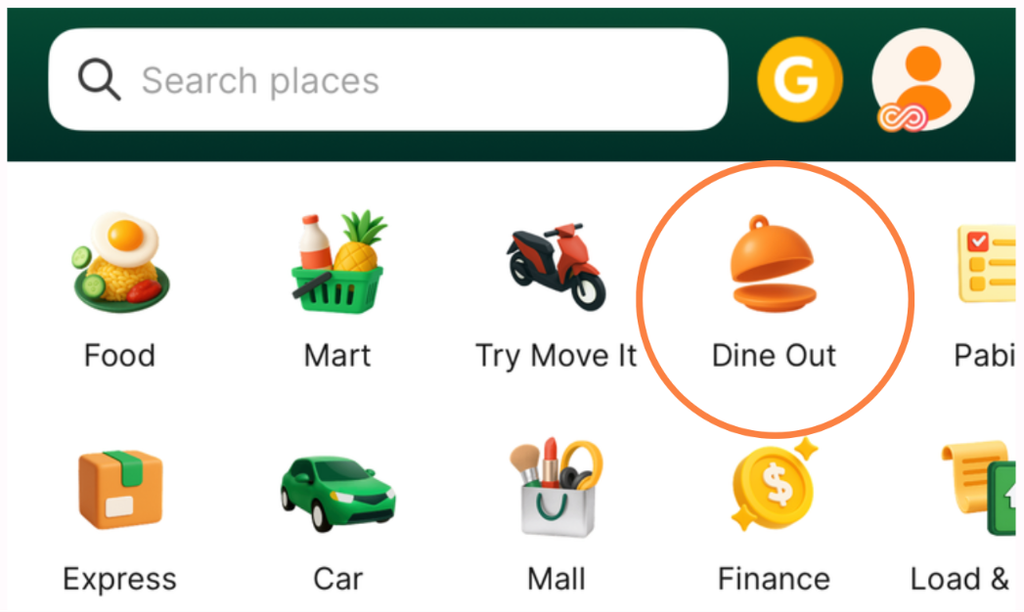
2. Search for the restaurant you are sitting in and open its page.
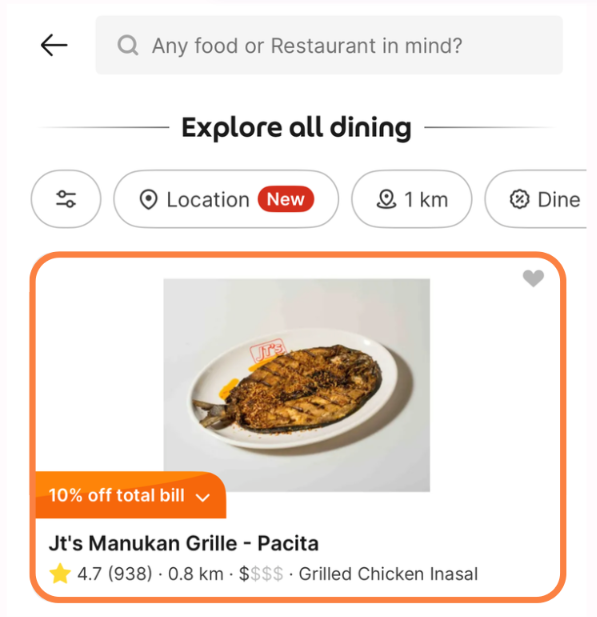
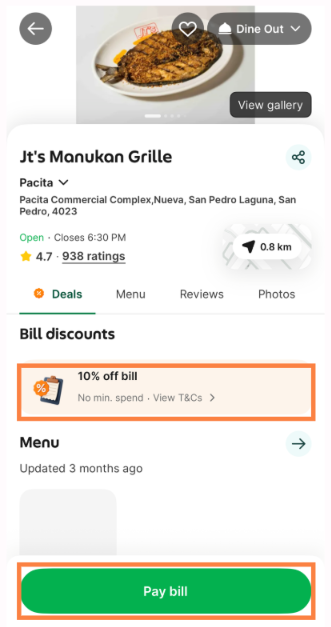
3. Tap the available discount and choose Pay Bill.
4. Enter the total on your bill before the discount. Pay through the app. Your discount is applied to the amount you pay.
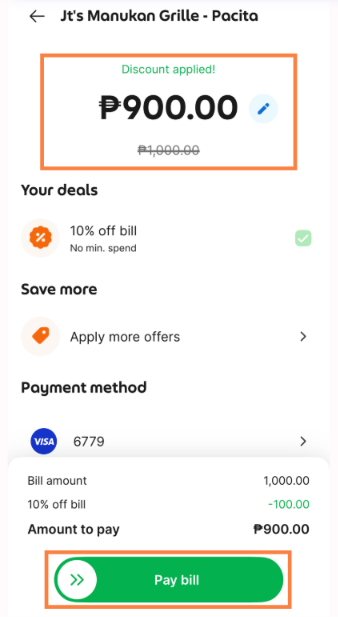
Grab’s Pay With Grab feature lets you pay using the bank accounts or e-wallets you have already linked to the app. Because you are paying through Grab, tell your server before they process your bill so you do not pay twice.
How Do You Use a Dine Out Voucher?
Use this when you already know where you are eating and want to lock in a deal.
- Open Dine Out in the Grab app and pick a restaurant.
- Browse the available vouchers and read the details, including the validity period and what is included.
- Buy the voucher in the app.
- When you dine in, open the voucher and redeem it with a tap when it is time to pay.
Grab has said it is rolling out refunds for unused pre-purchased vouchers across its markets in stages. Since that may not apply to every voucher, check the refund terms before you buy.
Discount or Voucher, Which Should You Pick?
| Dine Out Discount | Dine Out Voucher | |
|---|---|---|
| When you pay | At the restaurant, through the app | Before your visit |
| Best for | Spontaneous meals | Planned meals and special occasions |
| How the discount works | Percentage off your total bill (up to 20% advertised) | You buy at a lower price than the voucher’s value |
| Risk | Low, since you pay only after eating | You may not use it before it expires |
| Extras | None | Some include chef-curated dishes |
Think of it like this. A discount is the flexible option, and a voucher is the planned option. If you are not sure you will go, start with a discount.
How Much Can You Really Save?
These are illustrative examples. Your actual discount depends on the restaurant’s deal.
| Scenario | Bill | Discount | You Pay |
|---|---|---|---|
| Couple’s dinner | ₱2,000 | 20% (₱400) | ₱1,600 |
| Family of four | ₱3,500 | 15% (₱525) | ₱2,975 |
| Barkada lunch | ₱5,000 | 10% (₱500) | ₱4,500 |
Let’s say you eat out twice a month with a ₱2,000 bill each time. At 20% off, you would save about ₱400 per meal, or ₱800 a month. That is ₱9,600 a year, which is real money for a habit you already have. The catch is that savings only count if the discount makes you choose a restaurant you would have chosen anyway. Eating out more often because of the deal can cancel the savings.
Also check whether the discount applies to the full bill, including service charge, or only to certain items. This can differ between restaurants.
Can You Earn GrabCoins With Dine Out?
Grab renamed its GrabRewards points to GrabCoins, with existing points converted one to one. Grab has said that booking tables through Dine Out is one of the actions that can earn extra coins in a phased rollout. In the Philippines, coins can reduce your GrabFood or GrabMart bill at checkout, starting from a minimum of 15 GrabCoins (about ₱1). Coins earned from January 2026 expire six months after the month they were earned, so use them regularly.
How Do You Get the Most Out of Dine Out?
- Check the Dine Out section before choosing a restaurant, not after you sit down.
- Look for the Terms & Conditions, especially the minimum spend requirement.
- Read the ratings and reviews from Grab-verified customers, which Grab shows on restaurant pages.
- Compare the Grab deal with other promos you already have, such as credit card or bank offers. Do not assume they can be combined.
- For planned dinners, compare the voucher price with the discount you would get by paying the bill in the app.
- Set a calendar reminder for voucher expiry dates so the money you prepaid does not go to waste.
- If you also order delivery or pickup, keep an eye on your GrabCoins balance and expiry.
What Should You Watch Out For?
- “Up to 20%” is a ceiling, not a guarantee. Many deals will be lower.
- Blackout days. Grab’s merchant terms have listed public holidays as excluded, so check each deal before a holiday dinner.
- Enter the correct bill amount. Typing the wrong total means paying the wrong amount.
- Vouchers have validity periods. Unused vouchers may expire, and refund rules can vary.
- Partner lists change. A restaurant you saw last month may not be listed today.
Frequently Asked Questions
Is Grab Dine Out free to use?
Using a Dine Out discount does not cost extra on top of your bill, and restaurants pay Grab a service fee. Vouchers are purchased upfront at a discounted price. Always read the terms shown in the app.
Do I need to order through GrabFood?
No. Dine Out is for meals you eat at the restaurant, separate from delivery or pickup.
Can I combine Dine Out with other discounts like senior or PWD discounts?
This is not stated in Grab’s public information. Ask the restaurant before you pay, since discount rules can differ by establishment.
Can I get a refund on an unused voucher?
Grab has said refunds on pre-purchased vouchers are being rolled out progressively. Check the specific voucher’s terms before buying.
Can I book a table through Grab?
Grab’s merchant program lists reservations as part of Dine Out, but availability depends on the restaurant. Look for a reservation option on the restaurant’s page.
Who do I contact if something goes wrong?
Use the Help Centre inside the Grab app, and keep your payment confirmation as proof of the transaction.
Final Thoughts
Grab Dine Out is a simple way to trim your restaurant bill if you already use Grab. The discount option suits spur-of-the-moment meals, and vouchers suit planned ones. The biggest wins come from checking the app before you pick a restaurant, reading the fine print, and making sure the deal does not push you to spend more than you planned.
Offers and partner restaurants change often, so treat the figures here as a guide and confirm the current deal in your app before you eat.
Related Articles
Visa x Google Pay ₱1,500 Cashback Promo: Complete Guide
RCBC Spend Anywhere Promo: April 2026 to June 2026

UnionBank Unlock More Treats Promo: Feb to June 2026

No Annual Fee Credit Cards in the Philippines (NAFFL Promos)

BPI Visa Shop Anywhere Promo: April 2026 to June 2026
