If you’re setting up a sole proprietorship in the Philippines, you generally need to register your business name with the Department of Trade and Industry (DTI) through their online portal, the Business Name Registration System (BNRS). This is different from a business permit (which you get from your local government unit), DTI registration gives your business its legal trade name.
In simple terms, this is the very first step before you can apply for a mayor’s permit or register with the BIR.
Who Needs to Register with DTI?
DTI registers business names for sole proprietorships only. If you’re a freelancer, online seller, or solo entrepreneur operating under a name other than your own legal name, this is your registering agency.
If you’re planning to form a corporation, One Person Corporation (OPC), or partnership, you’ll register with the Securities and Exchange Commission (SEC) instead, not DTI.
Once you’re DTI registered, do not forget to process your BIR registration to avoid any penalties. You can read this guide to figure out which income tax option works for you.

What You’ll Need Before You Start
Before opening the BNRS portal, make sure you have:
- A working email address (your certificate will be sent here)
- At least one proposed business name (have backups ready in case it’s already taken)
- You must be at least 18 years old and a Filipino citizen (foreign nationals follow separate rules with additional documents)
There’s no minimum capital requirement for a Filipino sole proprietor, and the entire process can be done online, you typically won’t need to visit a DTI office.
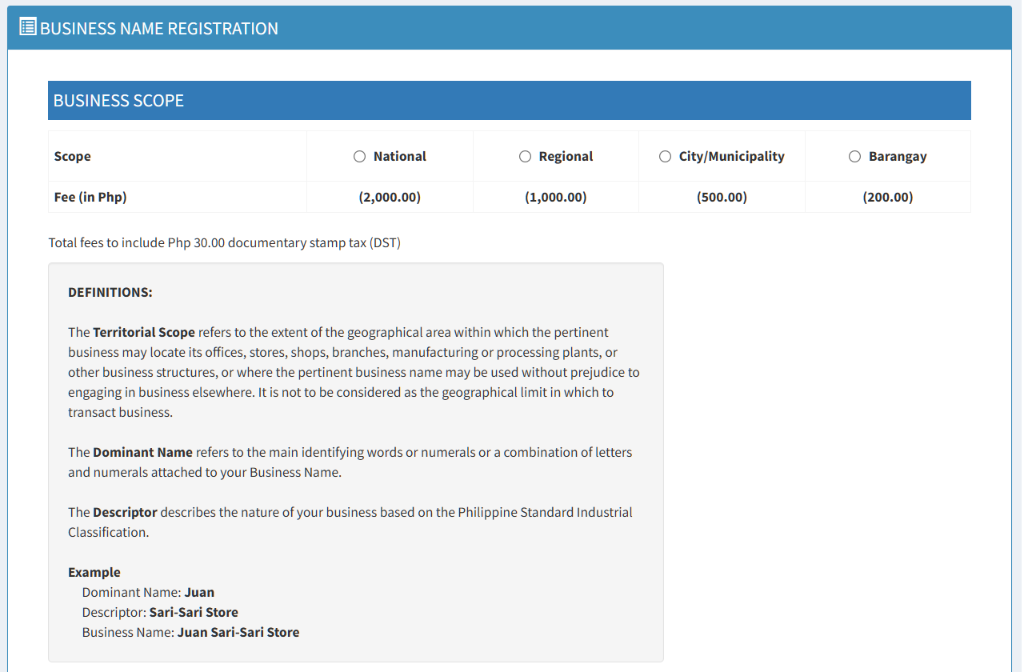
DTI Registration Fees by Territorial Scope
Your fee depends on how wide an area you want your business name protected in. This is called territorial scope.
| Territorial Scope | Coverage | Registration Fee | + Documentary Stamp Tax | Total |
|---|---|---|---|---|
| Barangay | Single barangay | ₱200 | ₱30 | ₱230 |
| City/Municipality | One city or municipality | ₱500 | ₱30 | ₱530 |
| Regional | Entire region | ₱1,000 | ₱30 | ₱1,030 |
| National | Entire Philippines | ₱2,000 | ₱30 | ₱2,030 |
Tip: Choose Barangay or City/Municipality if you’re purely local. Go Regional or National if you’re planning to expand or franchise soon, since a wider scope protects your name across a bigger area.
Step-by-Step: How to Register Online via BNRS
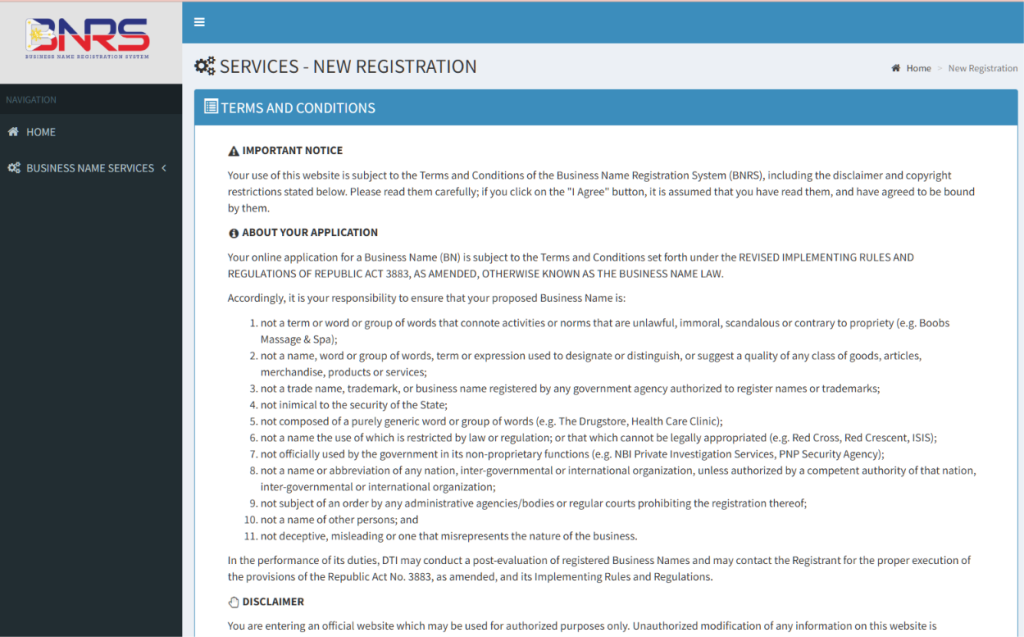
1. Go to the BNRS portal. Visit bnrs.dti.gov.ph and click “New Registration” under Business Name Services. Read and click “I Agree” on the Terms and Conditions.
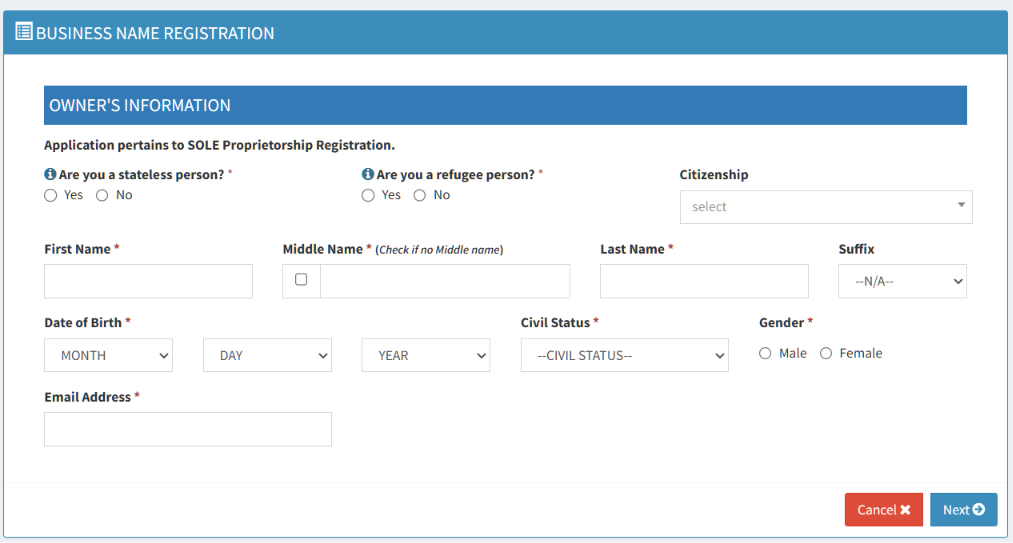
2. Fill out the Owner’s Information form. Complete all fields marked with a red asterisk. Make sure to provide your TIN here too.
3. Choose your business scope.
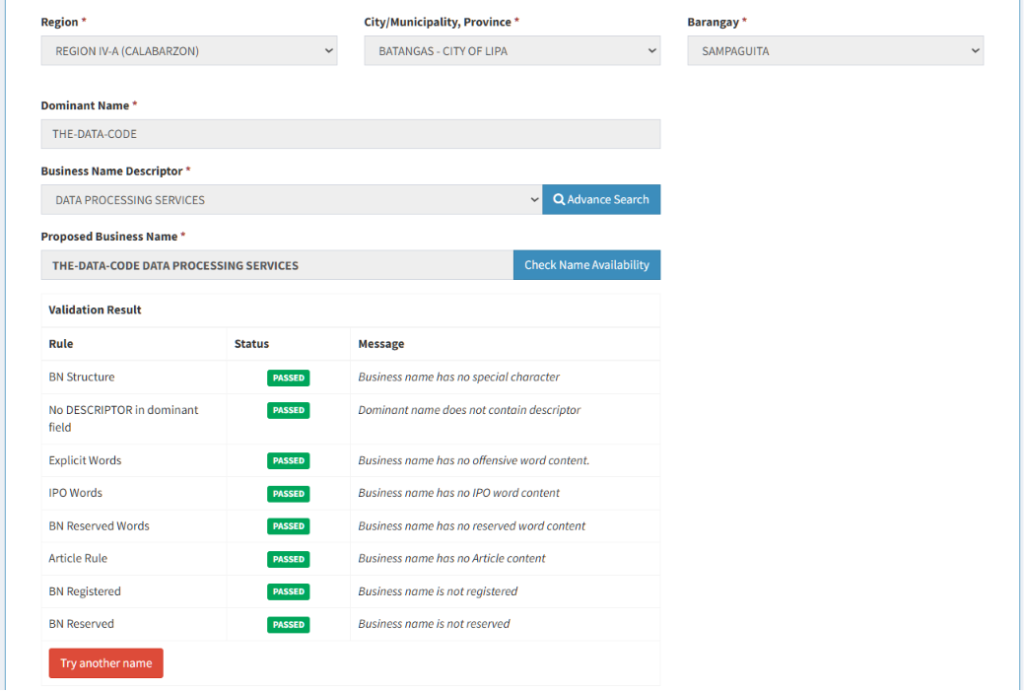
4. After choosing the business scope, nominate your preferred business name. Note that there are limitations on the words you can include in your business name.
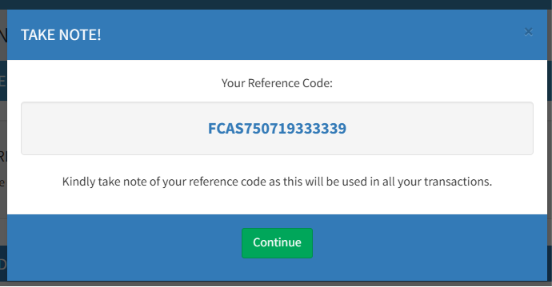
5. Confirm the details and save the reference code to be flashed on your screen. You can take a picture or a screenshot.
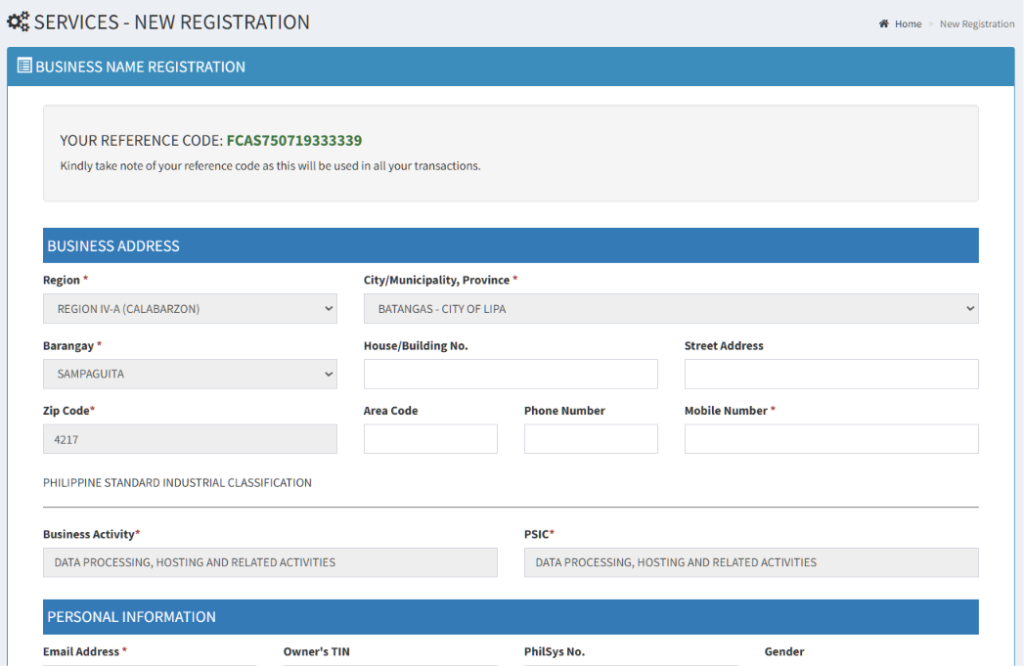
6. Complete the remaining sections. Fill out your Business Address, Personal Information, Residence Address, and Other Details.
7. Review your accomplished form. Double-check everything, especially your email address, since your Certificate of Business Name Registration (CBNR) will be sent there.
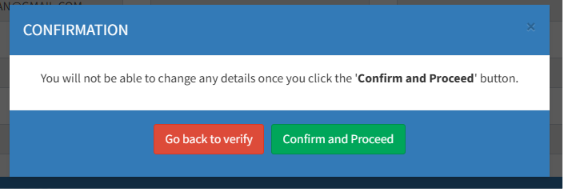
8. Agree to the Undertaking. Click “Proceed” to signify conformity. You can download a copy of the Undertaking for your records.
9. Choose your payment method and pay. Options include DTI Teller, GCash, PayMaya, Landbank Link.Biz, or Credit/Debit Card. Pay within 7 calendar days from your application date, otherwise your registration will be considered abandoned and nullified.
10. Click “Register New Business.” Once your payment is confirmed, click this to finalize. Congratulations, your business name is now registered.
You’ll receive your CBNR via email shortly after. Print a copy and keep it on hand, you’ll need it for your BIR registration and mayor’s permit application.
Dominant Name, Business Name Descriptor, and Restricted Words
Before you can move on to fees and scope, you need to understand how a DTI business name is actually built. Every registered business name is made up of two parts: a Dominant Name and a Business Name Descriptor. Get this wrong and the system will reject your application before you even get to pay.
What is a Dominant Name?
Your Dominant Name is the unique, identifying part of your business name, the brand itself. It can be a word, a phrase, your own name, or even a combination of letters and numbers. This is the part that’s supposed to stand out and set your business apart from everyone else’s.
Example: in “Juan’s Coffee Roastery,” Juan’s is the Dominant Name.
What is a Business Name Descriptor?
The Business Name Descriptor describes what your business actually does. It’s based on the Philippine Standard Industrial Classification (PSIC), and the BNRS portal will suggest matching descriptors as you type in keywords about your business.
Example: in “Juan’s Coffee Roastery,” Coffee Roastery is the Descriptor.
Put together, your Dominant Name and Descriptor form your full registered business name. You’ll be asked to enter both separately on the BNRS portal, and the system checks the combination for availability.
Words and Names You Can’t Use
DTI will reject your proposed business name if it falls into any of these categories:
- Purely generic names. “Coffee Shop” or “Laundry Services” on its own won’t pass, you need a Dominant Name that makes it unique.
- Corporate or partnership terms. Since DTI registration is only for sole proprietors, you can’t use words like “Inc.,” “Corp.,” “Corporation,” “Incorporated,” “Company,” “Cooperative,” “Foundation,” or “Partnership.”
- Names that copy existing trademarks or business names. Anything confusingly similar to an already-registered trade name, trademark, or brand (like a name that closely mimics “Jollibee” or “Starbucks”) will be flagged.
- Names that suggest quality or ranking. Phrases like “Best Lechon” or “Top 1 Computer Repair” aren’t allowed since they’re considered self-serving claims rather than identifiers.
- Names tied to government agencies or international bodies. You can’t use abbreviations that resemble government offices (like “NBI” or “DTI”) or the names of nations and international organizations without authorization.
- Unlawful, offensive, or scandalous names. Anything indecent, immoral, or contrary to public propriety will be rejected outright.
- Misleading or deceptive names. Your business name can’t misrepresent the nature of your business or confuse the public about what you actually offer.
- Names that belong to other people. You generally can’t register someone else’s personal name as your business name without authorization.
- Names restricted by law or already reserved for government use. Some words and phrases are off-limits because another law or regulation has already claimed them.
Tip: Always prepare 2-3 backup name combinations. A lot of straightforward Dominant Names get rejected simply because someone else has already.

How Long Is Your Registration Valid?
A DTI Business Name Certificate is valid for 5 years from the date of registration. You can renew as early as 180 days before expiry through the same BNRS portal.
If you miss the deadline, you get a 90-day grace period for penalty-free renewal. Beyond that, late renewal carries a 50% surcharge on your registration fee, so it pays to renew early.
Common Mistakes to Avoid
- Don’t delay payment. Missing the 7-day payment window nullifies your application, and you’ll need to start over.
- Don’t confuse DTI registration with a business permit. They’re two separate processes, DTI gives you the name, your LGU gives you permission to operate.
- Don’t pick too narrow a scope if you’re planning to expand soon. Upgrading later means paying again.
- Don’t lose your Reference Code. You’ll need it for renewals, certifications, and resuming incomplete transactions.
Final Thoughts
Registering your business name with DTI is one of the easiest parts of formalizing your business, the entire process can be done online in one sitting, and fees start at just ₱230. The key is choosing the right territorial scope upfront and paying within the 7-day window so your application doesn’t get nullified. Once you have your CBNR in hand, you’re ready to move on to your BIR registration and local business permit.
Related Articles

How to Change Your Tax Rate in the Philippines (Step-by-Step Guide)
BIR Form 1701-MS: How to Fill Up and File

Understanding Business Permit and BIR Requirements for Annual Renewal

How to Use eBIRForms: A Beginner-Friendly Guide

BIR Form 1701Q Simulator For Quarterly Income Tax Filing