
Paying your Social Security System (SSS) contribution online has become one of the most convenient ways for members to stay compliant and maintain continuous coverage. With digital payment channels now widely available, members no longer need to visit SSS branches or payment centers just to remit their contributions. Whether you are an employer, self-employed, a voluntary member, or an OFW, understanding how online SSS payments work is essential to avoiding penalties and ensuring uninterrupted benefits.
This guide explains everything you need to know about paying SSS contributions online, from eligibility and contribution requirements to payment channels, deadlines, and common issues, so you can confidently manage your contributions anytime, anywhere.
- What Is an SSS Contribution and Why It Matters
- Who Can Pay SSS Contributions Online
- Contribution Amounts and Payment Frequency
- Requirements Before Paying SSS Contribution Online
- How to Generate PRN
- Online Payment Channels for SSS Contributions (Step-By-Step Guide)
- Deadlines and Posting of Online Payments
- How to Check If Your SSS Contribution Was Posted
- Common Problems When Paying SSS Contributions Online
- Advantages of Paying SSS Contribution Online
- Key Takeaway
What Is an SSS Contribution and Why It Matters
An SSS contribution is the amount paid monthly by members (and employers, if applicable) to fund social security benefits. These contributions entitle members to benefits such as sickness, maternity, disability, retirement, funeral, and death benefits. The amount you contribute directly affects the benefits you can receive in the future, especially for long-term benefits like retirement and disability pensions.
Failing to pay contributions on time can lead to gaps in coverage, which may result in denied claims or reduced benefits. This is why SSS encourages members to use online payment options that make it easier to pay regularly and on time.
Who Can Pay SSS Contributions Online
Most SSS members can pay their contributions online, but the process and requirements may vary depending on membership type.
- Employed members usually do not need to pay contributions themselves, as their employers handle remittance. However, those transitioning from employed to self-employed or voluntary status must start paying on their own.
- Self-employed members, voluntary members, and OFWs are fully responsible for paying their SSS contributions. Online payment channels are especially useful for these groups since they do not rely on employer remittances.
Before paying online, it is important to ensure that your SSS membership status and contribution type are correctly updated in the SSS system, as this affects both the contribution amount and payment validation.
Contribution Amounts and Payment Frequency
SSS contributions are based on a monthly salary credit (MSC), which corresponds to your declared income or compensation. The higher your MSC, the higher your contribution, and the higher your potential benefits.
Self-employed and voluntary members typically choose their MSC within the allowed range, while OFWs follow a fixed contribution table based on income brackets. Contributions are usually paid monthly, but some members choose to pay quarterly or in advance, depending on eligibility and SSS rules.
When paying online, it is crucial to ensure that the contribution amount matches the correct MSC and payment period to avoid posting errors.
Requirements Before Paying SSS Contribution Online
Before you can pay your SSS contribution online, you need a few basic requirements in place.
- You must have an active SSS number and updated membership records. Any changes in status, such as shifting from employed to voluntary, should be reflected in the SSS system.
- You need a Payment Reference Number (PRN). The PRN is a unique number generated by SSS that identifies your contribution payment, including the applicable period and amount. Most online payment channels require a valid PRN for successful posting.
- You must have access to an accredited online payment channel, such as online banking, mobile wallets, or payment apps that support SSS contributions.
How to Generate PRN
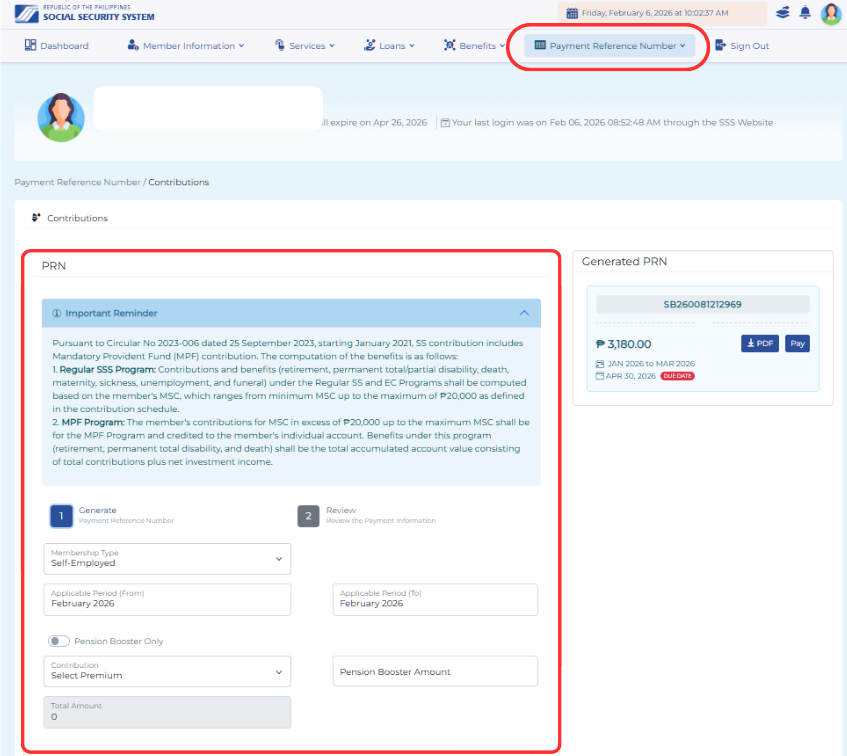
You can only pay our SSS contributions online if you know your PRN. The good news is that you can generate one in the comfort of your home. Simply log in to your SSS account and go to the Payment Reference Number tab. Fill in the required details:
- Membership type
- Applicable period (you can generate PRN for future months)
- Choose your premium in the dropdown.
- Input your desired Pension Booster amount.
- Generate PRN once the info are completed
If you are an employer, your PRN are automatically generated every month, and must also be paid within the specified deadline.
Online Payment Channels for SSS Contributions (Step-By-Step Guide)
SSS has partnered with multiple digital payment platforms to make online contribution payments accessible to members. These include online banking platforms of major Philippine banks, mobile wallets, payment apps, and authorized third-party payment services.
Each payment channel may have its own processing time, service fees, and cut-off schedules. Some payments are posted in real time, while others may take a few banking days to reflect in your SSS records. Understanding these differences helps you choose the best option based on urgency and convenience.
UnionBank Mobile App (Recommended)
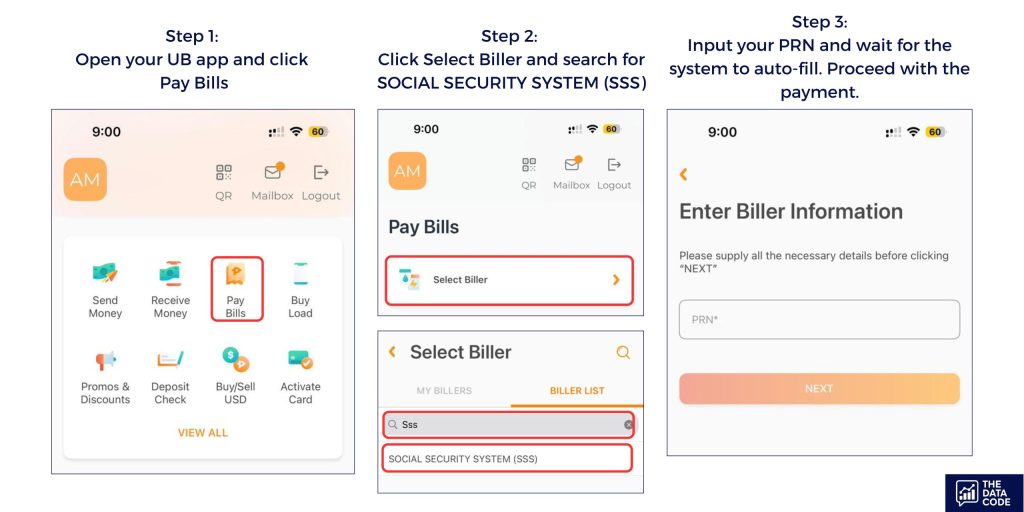
- Open your Unionbank mobile app and click Pay Bills.
- Click Select Biller and search for SOCIAL SECURITY SYSTEM (SSS).
- Input your PRN and wait for the system to auto-fill.
- Proceed with the payment.
Other details
- No additional fees
- Only needs PRN
- Applicable even for employer contributions
Bayad Online
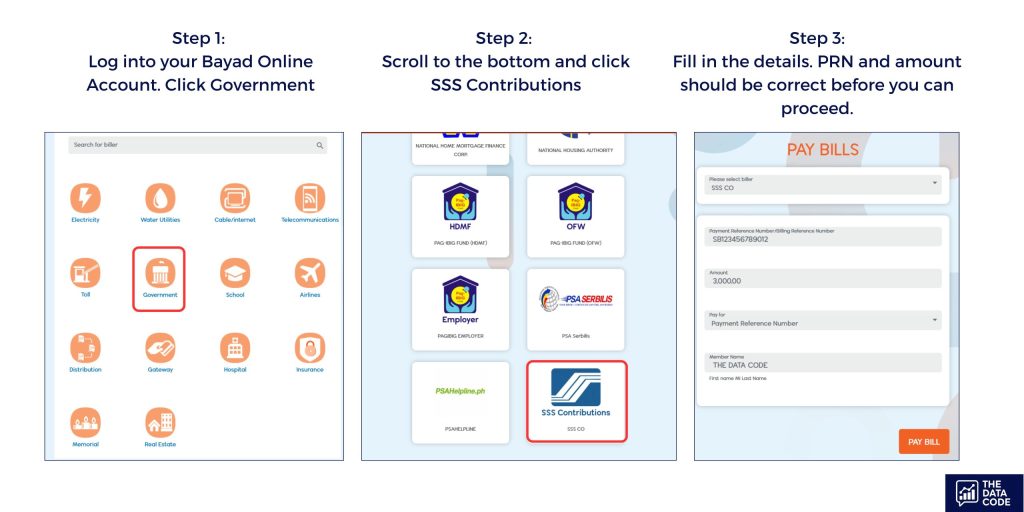
- Log in to your Bayad Online account. Click Government.
- Scroll to the bottom and click SSS Contributions.
- Fill in the details. PR should be correct before you can proceed. If you are unsure of the amount, input an estimate, and the system will give you the correct value.
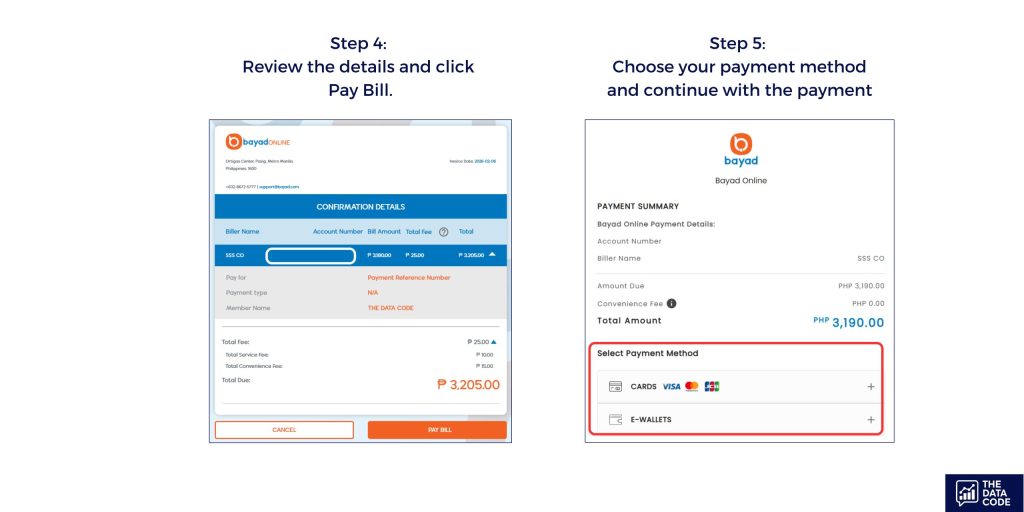
- Review the details and click Pay Bills.
- Choose your payment method. You can pay using credit cards, debit cards, or e-wallets (GCash and Maya).
- Continue and complete the payment.
Other details
- Has a convenience fee of P25
- Can pay using credit cards
- Accessible to anyone, doesn’t require bank account opening
- Employer contributions currently not accepted
GCash App
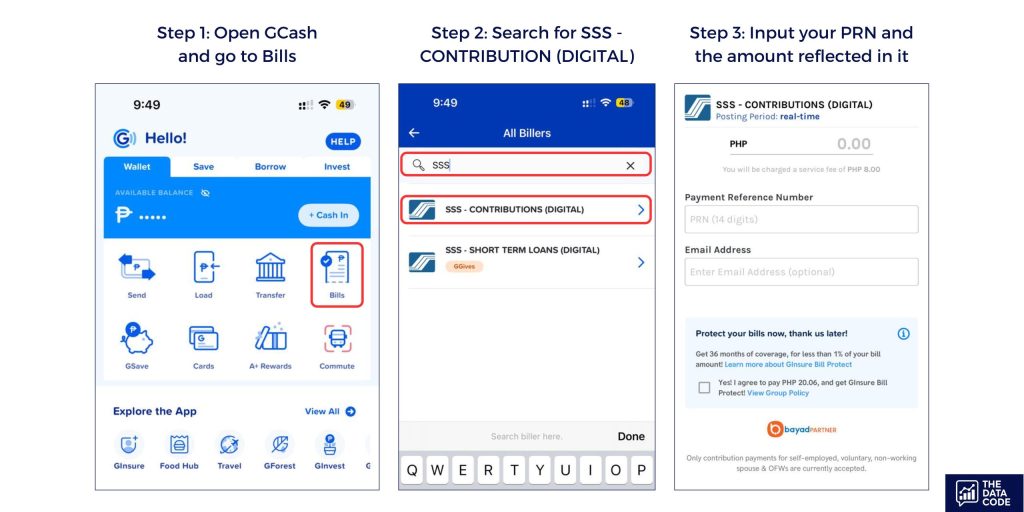
- Open GCash and go to Bills.
- Search for SSS – CONTRIBUTIONS (DIGITAL)
- Input the PRN and the amount to be paid.
- Proceed with the payment.
Other details
- Has a convenience fee of P8
- Accessible to many
- Employer contributions may not be accepted
Maya App
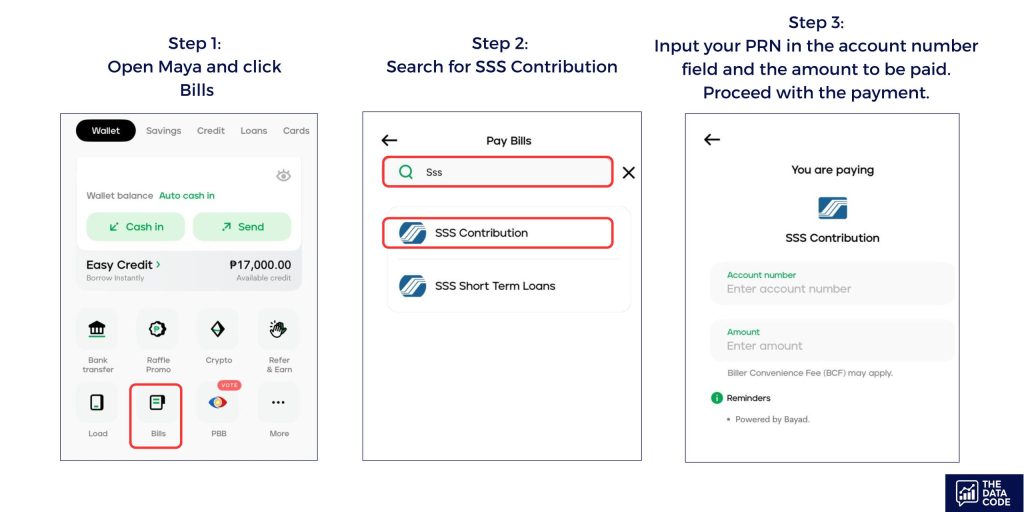
- Open Maya and click Bills.
- Search for SSS Contribution.
- Input your PRN in the account number field and the amount to be paid.
- Proceed with the payment.
Other details
- Has a convenience fee of P8
- Accessible to many
- Employer contributions may not be accepted
SSS Web Portal
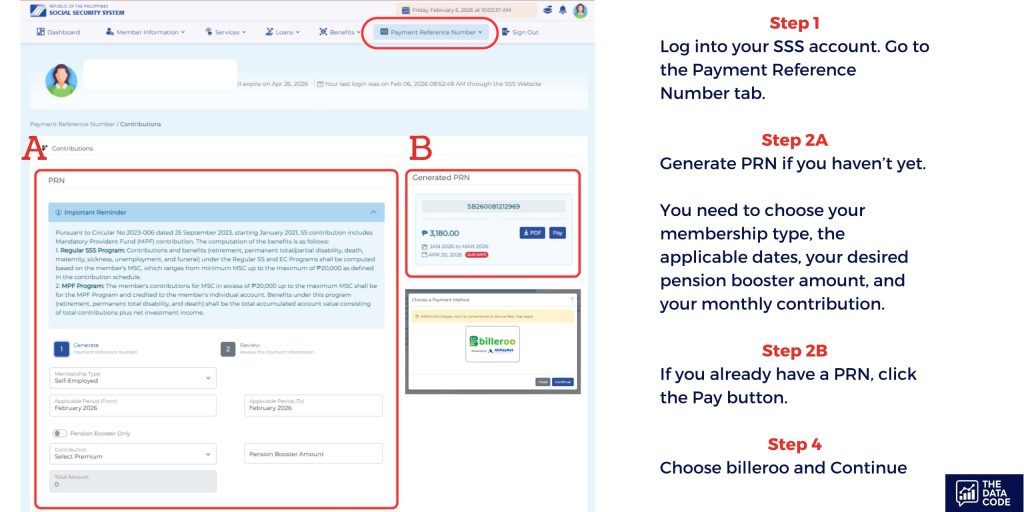
- Log into your SSS account. Go to the Payment Reference Number tab.
- Generate PRN if you haven’t yet. You need to choose your membership type, the applicable dates, your desired pension booster amount, and your monthly contribution.
- If you already have a PRN, click the Pay button.
- Choose billeroo and Continue.
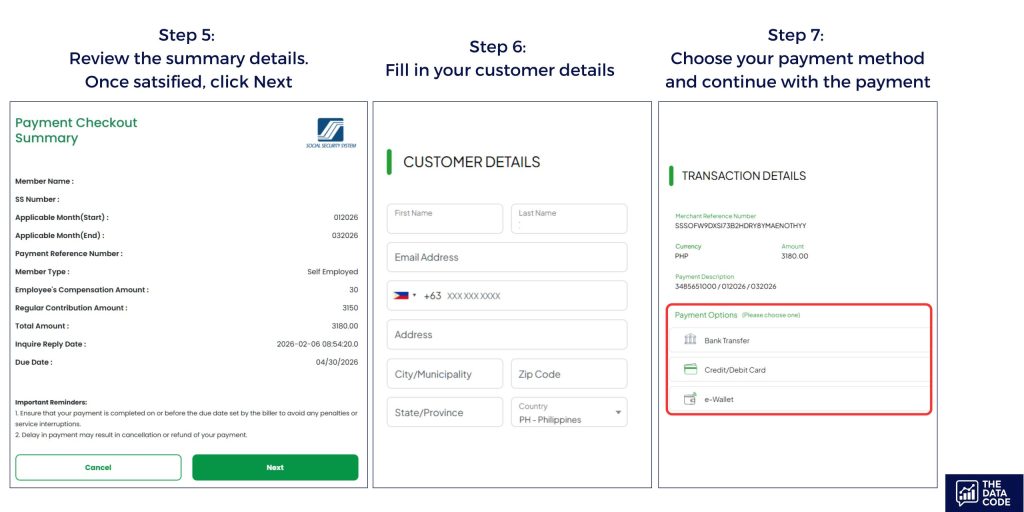
- Review the summary details. Once satisfied, click Next.
- Fill in the customer details.
- Choose your payment method and continue with the payment.
Other details
- Comes with an expensive convenience fee of around 2.25% (e.g., P3,180 contribution has a fee of P71.60)
- Can pay using credit cards
- Accessible to anyone, doesn’t require bank account opening
- Applicable even for employer contributions
Deadlines and Posting of Online Payments
SSS follows specific payment deadlines depending on membership type. For self-employed and voluntary members, contributions are typically due monthly or quarterly, based on the applicable schedule set by SSS. OFWs may pay monthly or in advance.
Online payments must be made on or before the deadline to be considered on time. While many digital channels process payments instantly, posting to your SSS account may still take time. It is recommended to pay a few days before the deadline to avoid issues caused by system delays or banking cut-offs.
Always keep your payment confirmation or transaction receipt until the contribution is successfully reflected in your SSS records.
How to Check If Your SSS Contribution Was Posted
After paying online, members should verify whether the contribution has been properly posted. This can be done through the My.SSS online portal or the SSS mobile app, where contribution histories are displayed.
If a payment does not appear after the expected posting period, it may be due to an incorrect PRN, mismatched payment amount, or delayed processing by the payment provider. Prompt verification allows you to address issues early and avoid gaps in your contribution record.
Common Problems When Paying SSS Contributions Online
One common issue is using an expired or incorrect PRN. Since PRNs are usually valid only for a specific period, generating a new one is necessary if you miss the payment window.
Another frequent problem is paying an amount that does not match the PRN details. This can lead to delayed posting or unposted payments that require manual reconciliation with SSS.
Technical issues such as failed transactions, duplicate payments, or delayed confirmations can also occur. In these cases, keeping your transaction reference number and contacting either the payment provider or SSS customer service is essential.
Advantages of Paying SSS Contribution Online
Paying SSS contributions online offers convenience, flexibility, and time savings. Members can pay anytime without traveling to SSS branches or payment centers. Online payments also reduce the risk of missed deadlines, especially for voluntary members who manage their own contributions.
Digital payment records make it easier to track transactions, verify postings, and resolve discrepancies. For OFWs and remote workers, online payment options provide a reliable way to maintain SSS coverage regardless of location.
Key Takeaway
Paying your SSS contribution online is one of the easiest ways to stay compliant and protect your social security benefits. By understanding contribution requirements, payment channels, deadlines, and verification methods, you can confidently manage your SSS obligations without unnecessary stress.
As long as you generate the correct PRN, pay the accurate amount, and monitor your contribution records, online payments offer a fast and reliable alternative to traditional over-the-counter transactions.
Related Articles
High Dividends, Low Risk: Pag-IBIG MP2 Savings Program

SSS Maternity Benefit for Childbirth, Miscarriage & Emergency Termination
